Skype us at scommerce.mage or call +44(0)1483 487746


Magento 2 Content Protection
£89.99
Compatible with Magento 2 community and enterprise 2.3.3 - 2.4.x including cloud edition
ContentProtect for Magento 2 provides a streamlined, secure solution to password-protect any CMS, product, or category page without the need for complex customer group configurations. Simply set a global password and toggle protection on any specific page in seconds. Once a visitor enters the correct password, access is granted for their entire session, no account creation required and no hassle for the user.
This extension is the ideal choice for B2B wholesale portals, VIP product ranges, exclusive pre-launch content, or members-only resources.
- Secure, encrypted global password protection
- Session-based access: enter the password once to browse all protected areas
- Full support for CMS, Product, and Category pages
- Smart redirect back to the original requested page after unlock
- Store-view scope support for multi-store and international setups
- Enterprise-grade security with CSRF-protected forms

Free Support
up to 60 days

Free Upgrades
up to 1 year

Fully open source
Product description
ContentProtect for Magento 2: Individual Page Password Protection
Compatible with Magento 2 community and enterprise 2.3.3 - 2.4.x including cloud edition
The Problem ContentProtect Solves
Magento 2 is a powerful platform, but it offers no simple, built-in way to put a password gate in front of an individual page. Customer groups and shared catalogues are capable tools, but they require every visitor to create an account and log in, and setting them up correctly demands real configuration effort.
ContentProtect solves a fundamentally different problem: you need to share a specific URL with a specific group of people, and you don't want the general public to see it. You don't need them to register. You just need a password.
Whether that's your wholesale trade catalogue, a pre-launch product, a members-only CMS page, or a set of restricted resources, ContentProtect handles it cleanly, quickly, and without touching core Magento files.
How It Works
ContentProtect uses Magento's native plugin system to intercept three controller actions, CMS page view, product page view, and category page view. When a visitor lands on a protected page, a lightweight session check runs:
- If the session unlock flag is not present, the visitor is immediately redirected to the gate page.
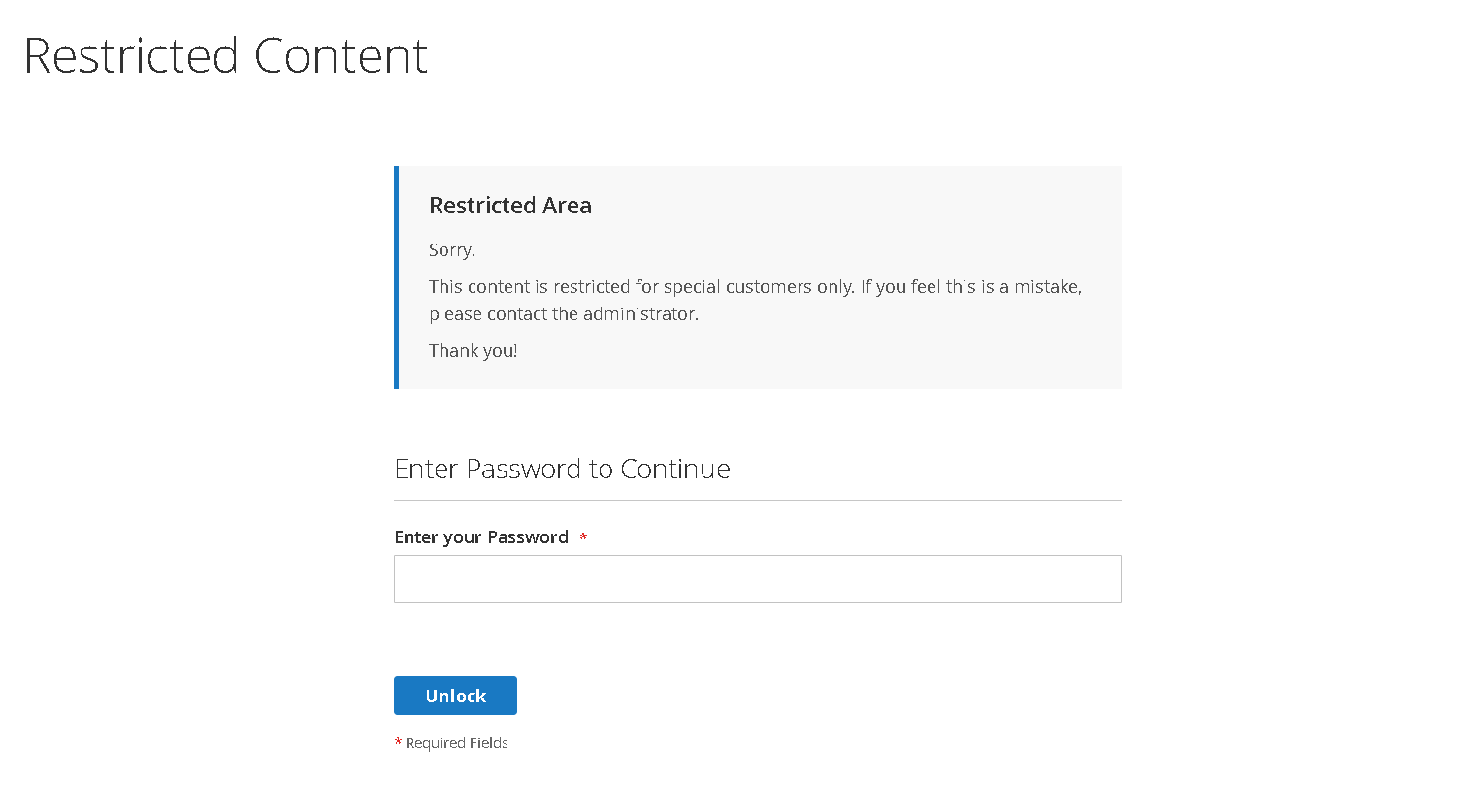
- The gate page displays a clean, theme-integrated password form with a customisable information message above it.
- The visitor enters the password and submits. The form is CSRF-protected using Magento's built-in form key system.
- If the password matches the encrypted config value, a session flag is set and the visitor is redirected directly to the page they originally requested, not to the homepage.
- For the remainder of that session, all protected pages (CMS, product, and category) load without any gate.
SCENARIO: 1
"I have a specific category of products intended only for my wholesale trade partners. I don't want to force them to create a full account just to view the current range and terms. Can I simply put a password on the 'Wholesale' category so I can share the link and password via email?"
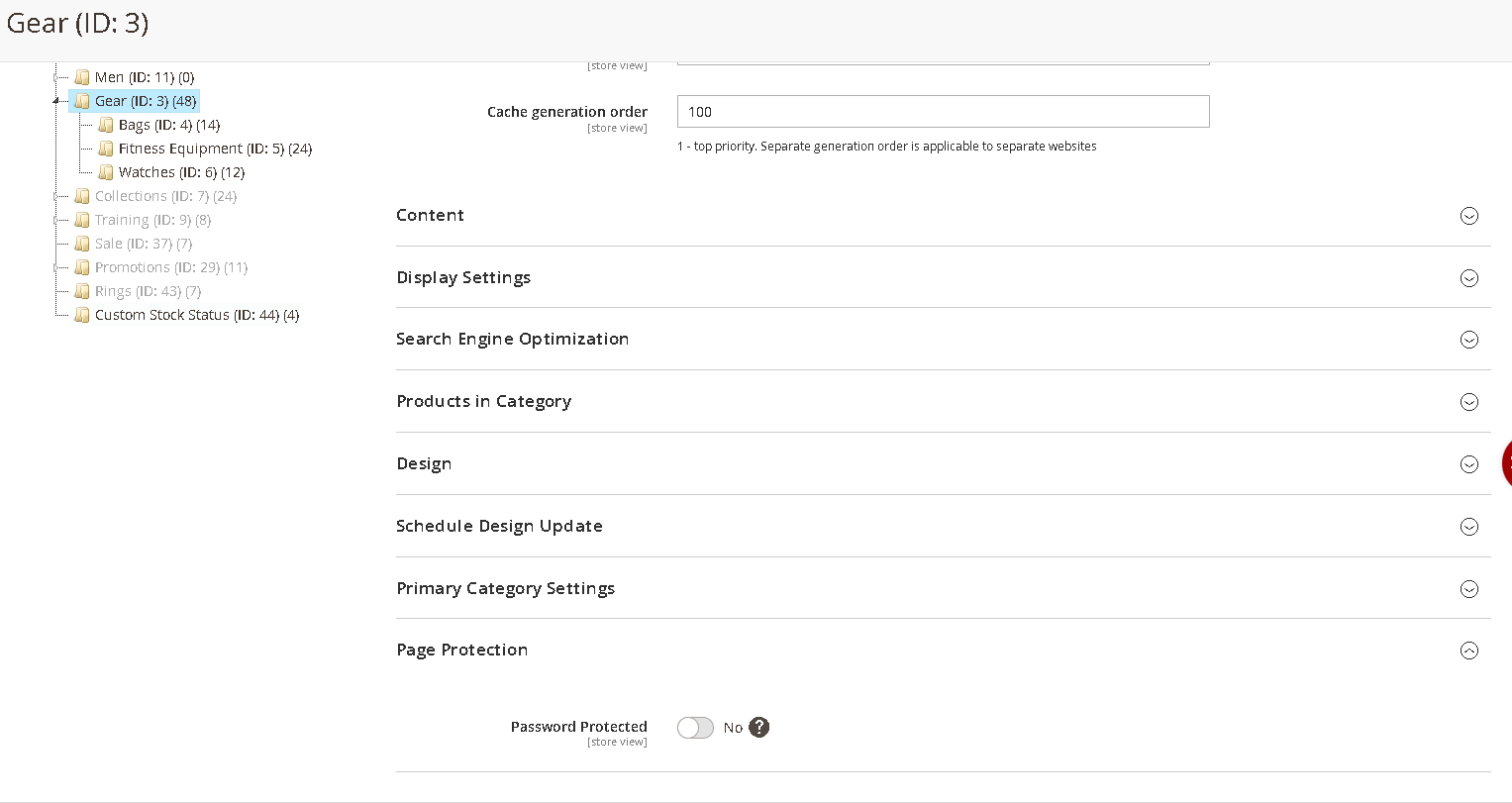
Yes! With ContentProtect, you simply navigate to Catalog > Categories, select your Wholesale category, and toggle "Enable Password Protected" to Yes under "Page Protection". Any visitor hitting that category or its products will be prompted for the password. Once entered, they can browse the entire protected range for the rest of their session.
SCENARIO: 2
"We are launching a new VIP product line next week and want to give our top customers early access via a private CMS landing page. We need this to be secure but easy for the customers to use. Does your extension support individual CMS pages?"
Absolutely. You can enable protection for specific CMS pages under Content > Pages. The extension uses an encrypted global password, meaning your VIPs use one simple code to unlock the content. Because the gate page inherits your store's header and footer, the customer experience remains professional and on-brand.
Strategic Use Cases
Trade-Only Wholesale Catalogue
The Challenge: A wholesale supplier runs a single Magento store serving both retail and trade customers. Their trade pricing, bulk pack sizes, and reseller SKUs must not be visible to the general public or indexable by search engines.
Implementation: They protect their entire "Trade Catalogue" category with a password, then share the URL and password with approved buyers during onboarding. Retail visitors see the public store normally. Trade buyers enter the password on their first visit and browse freely for the rest of their session, no account required.
Result: Trade pricing and wholesale-only products stay completely private, without building a separate store or maintaining a customer group structure.
Pre-Launch Exclusive Early Access
The Challenge: A brand is launching a limited-edition collection. They want newsletter subscribers to have 48 hours of exclusive shopping access before the public launch, without building a custom early-access system or gating the entire store.
Implementation: The new collection's category page and individual product pages are protected with a password included in the subscriber email. On launch day, the admin simply disables protection with a single config change, no page-by-page toggling needed thanks to the global enable/disable switch.
Result: Subscribers get a genuinely exclusive experience that rewards loyalty, set up in minutes with no custom development.
Gated Trade Terms, Agreements & Downloads
The Challenge: A distributor needs to host trade terms, reseller agreements, and technical data sheets on their website, accessible to authorised partners only, invisible to the public and competitors.
Implementation: They create CMS pages for each document and enable password protection on each. Partners receive the password as part of their onboarding welcome email. The same password works across all gated CMS pages, partners enter it once and access everything freely.
Result: Sensitive commercial documents hosted securely on Magento, partners access them instantly, the public never sees them.
Members-Only Product Range
The Challenge: A premium lifestyle brand sells a members-only product range exclusively to subscribers of their physical membership club. They need frictionless access for members without requiring them to create a website account.
Implementation: The members-only products are protected by a password printed on each member's welcome card and sent in their welcome email. Members visit the store, enter the password, and shop immediately. No account creation, no login wall, just seamless access that matches the premium feel of the brand.
Result: A frictionless, premium experience for members, without building or maintaining a custom account management portal.
Agency & Developer: Client Review Without Exposure
The Challenge: An agency needs to demo a new store build to their client on a live URL before launch, without exposing product pricing, content, or design to competitors, search engines, or the public.
Implementation: Key product and category pages are password-protected during the client review phase. The client receives the password and can browse the full, real store. When sign-off is granted, the agency disables protection globally in a single config change.
Result: Client reviews happen on the real production site without any risk of exposure, faster sign-offs and a more impressive, realistic demo experience.
Post-Event & Course Resources for Attendees
The Challenge: A training company sells event tickets through Magento. After the event, they want to give attendees exclusive access to CMS pages containing slides, recordings, and downloadable resources, for a limited window only.
Implementation: Post-event resource pages are protected with a time-limited password included in the follow-up email sent to all confirmed attendees. After 30 days, the password is changed and the old one expires naturally. No attendee portal to build or maintain.
Result: Attendees get a polished, exclusive post-event experience that is easy for the organiser to manage.
The Admin & Customer Experience
Admin: Once installed, a dedicated "Page Protection" fieldset with a toggle switch appears on every CMS page, product, and category edit screen. The toggle is injected via Magento's UI component merge system, meaning it appears reliably on every Magento 2.4.x installation without layout XML conflicts. The global password is set in Stores → Configuration → Scommerce → CMS Page Protect and is stored using Magento's encrypted backend model.
Customer: When a customer arrives at a protected page, they see a clean, full-width gate page that sits within your existing theme. After entering the correct password, they are taken immediately to the page they were trying to reach. If they then navigate to another protected page in the same session, it loads without any gate, frictionless browsing from that point forward.
Here are the main features of this module-:
- Password-protect individual CMS pages, product pages, and category pages
- Single global password, configured once in Stores, Configuration
- Password encrypted at rest using Magento's native encryption
- Session-based unlock, enter the password once, access all protected pages for the session
- Smart return URL redirect, customers land on their intended page after unlocking
- Per-page toggle in a dedicated "Page Protection" fieldset on each edit screen
- Store view scope for product and category protection attributes
- Full-width, theme-integrated gate page, no separate layout required
- Customisable gate page messaging via a single template file
- CSRF-protected password form using Magento's built-in form key
- No core file modifications, upgrade-safe and cleanly removable
- Compatible with full-page cache / Varnish
- Multi-store and multi-website compatible
We offer 60 days of free support and 12 months of free upgrade for any standard Magento site when you buy this extension. You can also get our installation service for a small fee. If you want more benefits, you can purchase our 12 months of free premium support and free lifetime upgrade package. Please contact us if you need any assistance or customization for this extension. We will reply to you within 48 hours. We may also offer you a special deal or a free solution if we like your idea.
** Please refer to our FAQ or T&C section for running our extensions on multiple domains or sub-domains
FAQ
Frequently Asked Questions
Q: Does the customer need to be logged in to use the password gate?
A: No. The password gate works for all visitors, whether they are logged in or browsing as a guest. The unlock flag is stored in the Magento customer session, which exists for both guest and authenticated sessions. Customers never need to create an account.
Q: Can I use a different password for different pages?
A: ContentProtect uses a single global password for all protected pages. This is by design to keep configuration simple and provide a single point of management. If you require granular, per-page or per-user-group passwords, we recommend utilizing Magento's native customer groups and shared catalogue features.
Q: Is the password stored securely?
A: Yes. The password is stored using Magento's native Encrypted backend model, which encrypts the value at rest in the
core_config_data table using your Magento installation's encryption key. It is never stored or transmitted in plain text. Q: Will it work with full-page cache (Varnish or Magento's built-in FPC)?
A: Yes. The plugin intercepts the request at the controller dispatch level, before the full-page cache serves a response. Protected pages trigger a redirect that is not cached. Once the session is unlocked, pages load normally and can be served from the cache for the remainder of the session.
Q: Does it work with the Hyva theme?
A: The backend logic—including plugins, session handling, and redirects, is fully theme-agnostic. The gate page template uses standard Magento layout handles. For Hyva, you can easily adapt the
gate.phtml file using Tailwind utility classes for a perfectly on-brand result.Q: What happens if I disable the module after going live?
A: Setting "Enable Module" to "No" in the configuration immediately disables all gate redirects, and every page will load normally. Your
is_password_protected attribute values are preserved in the database, so re-enabling the module restores all your configured protection settings instantly.Q: Will protected pages be indexed by search engines?
A: Search engine bots do not carry a session unlock flag, so they are redirected to the gate page just like any other visitor. Consequently, protected pages will not be indexed while protection is active, which is the standard desired behaviour for restricted content.
Q: How does the return URL redirect work?
A: When a visitor is redirected to the gate page, the original URL path is base64-encoded and passed as a return parameter. Upon a successful password entry, the controller decodes this path and redirects the visitor directly back to the page they originally requested, rather than the homepage.
Q: Can I protect pages on specific store views only?
A: For product and category pages, yes. The
is_password_protected attribute is scoped at the store view level. However, the CMS page flag is a flat database column, so CMS protection applies across all store views that serve that specific page. Q. How can I get license key for my development website?
A. Please use the same license as live site provided with the order confirmation email on the staging site and ensure you have the latest version of scommerce/core installed i.e 2.0.9.
Once added go to Stores>Configuration>Scommerce Configuration>Core and click on verify. Once verified the license will start working on your staging site.
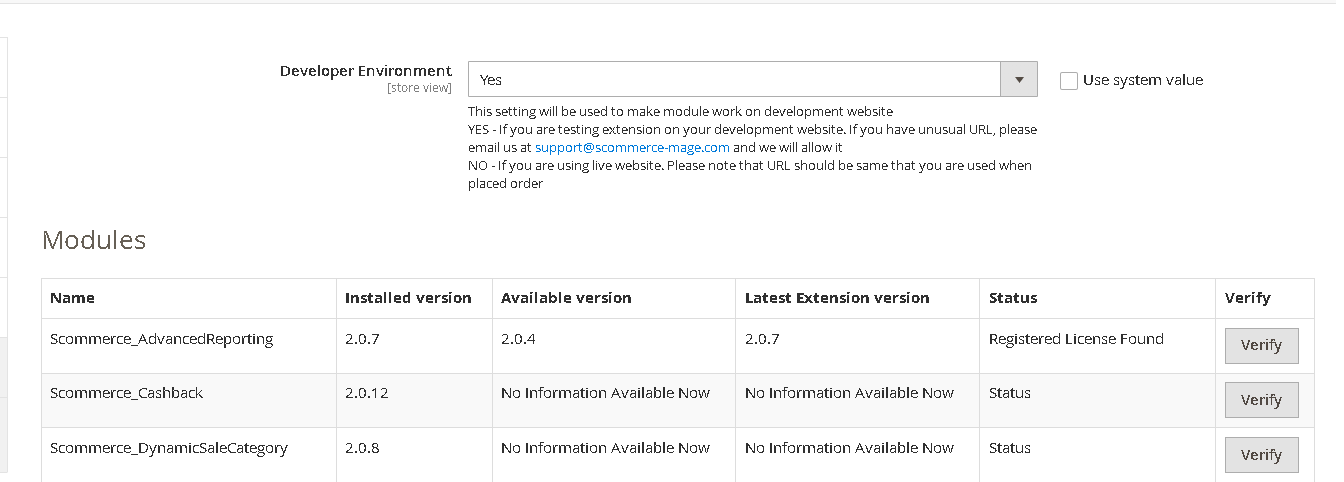
Once added go to Stores>Configuration>Scommerce Configuration>Core and click on verify. Once verified the license will start working on your staging site.
Q. Can I test the extension before buying?
A. Unfortunately we can't provide you extension for testing purposes but we have demo available for most of our extensions and happy to provide full refund if the extension doesn't work
Q. Can I request for customisation on your extensions?
A. Yes we do provide all sort of customisation for our clients at the reasonable rates. And if we believe the customisation will help our product then we also provide great discount on the customisation
Q. I have multiple websites/stores, each with a unique domain. Do I need a separate license key for each live domain?
A. Yes, each live domain requires its own license key. Our license keys are URL specific and each live domain, subdomain, subfolder requires a separate key. If you’re running multiple websites from the same Magento instance, we offer a 30% discount when purchasing license keys for two or more domains in a single order. To receive a coupon code, please contact us at support@scommerce-mage.com.
Q. How can I upgrade my extension to the latest version?
A. If your extension is within the free upgrade period (12 months from purchased date) then simply email us with your order number and our team will send you the latest version of the extension but if it is outside free upgrade period then you need to buy an upgrade using the following link
https://staging.scommerce-mage.com/magento-extension-installation-service.html
Once you received the latest version of our extension then we would highly recommend to delete all the files and folder of our extension from your website first before uploading the latest version because we might have removed existing files and keeping existing files could cause problems on your website.
https://staging.scommerce-mage.com/magento-extension-installation-service.html
Once you received the latest version of our extension then we would highly recommend to delete all the files and folder of our extension from your website first before uploading the latest version because we might have removed existing files and keeping existing files could cause problems on your website.
Q. Does my license get expired after certain period?
A. No, your license is not going to get expired but we would highly recommend upgrading to get all the latest fixes (including security fixes if any), improvements and new features. In the upgrade, we also ensure it is compatible with the latest version of Magento and when you upgrade you will have a smooth transition.
Q.Where can I download the extension files?
A. Please login into your account on our website and go to the download link under my account section to download the extension package.
Q.Can you provide a key that works for our development (NOT PRODUCTION) environment which will work on a dynamic URL, for example, 12334.gitpod.com and 4567.gitpod.com?
A. Unfortunately it is not possible to generate license keys based on the dynamic URLs.
License keys need to be generated per domain or subdomain whether it is production or non-production.
Q. How can I manually uninstall your module?
A. Please follow the below steps -:
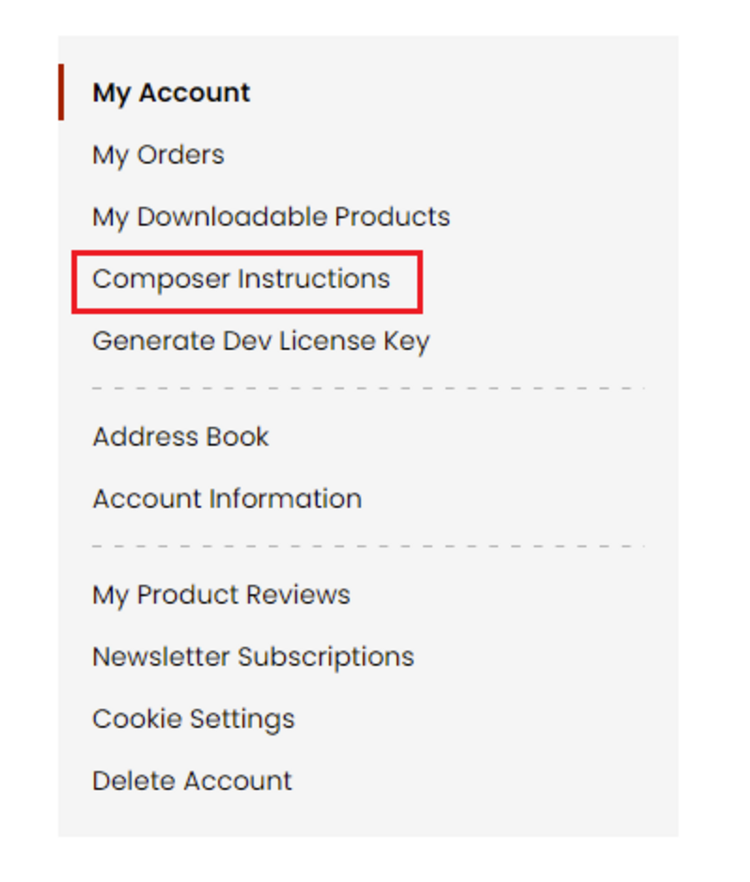
Step 1: Navigate to our store and login to your account. Then go to the My Account Section, on the left menu click on Composer Instructions.
 Step 2: Next, run the config commands shown on the top of the page then click on the extension that you want to install. A composer require command will be revealed in the dropdown menu. Run the command then clear caches to complete the installation.
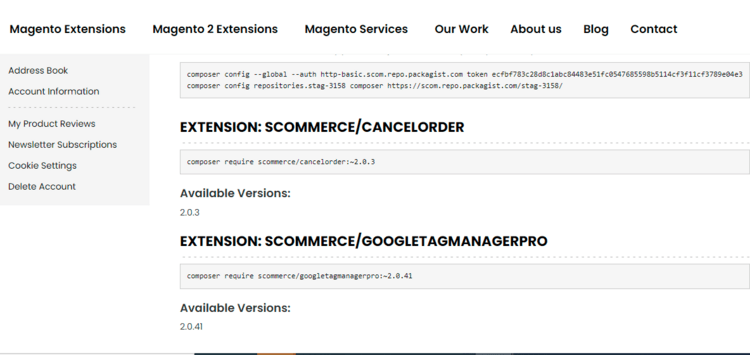
Step 2: Next, run the config commands shown on the top of the page then click on the extension that you want to install. A composer require command will be revealed in the dropdown menu. Run the command then clear caches to complete the installation.
Q. Do you support SPA (Single Page Application) / PWA (Progressive Web Application) / AMP ?
A. Unfortunately, we don’t support SPA or PWA or AMP but we may be supporting them in future depending upon the demand.
Change Log
Version 2.0.0
2026-04-10 09:43:09
Initial Release
Reviews
Write Your Own Review
You may also like
- Magento 2Breeze
 Magento 2 Admin Action LogMagento 2 Admin Activity Logger extension is developed to improve the security of your store and pro...£124.99
 - Magento 2 Magento 2 Admin Login SecurityEnhance the security of your Magento 2 admin panel with our comprehensive Magento 2 Advanced Admin L...£84.99
- Magento 2 Magento 2 Admin Account SwitcherTired of cumbersome workarounds when trying to replicate an issue or test permissions for another ad...£84.99
- Magento 2 Magento 2 Admin Message ManagerTired of sending generic alerts or struggling to communicate critical updates to your Magento admin ...£84.99
- Magento 2 Magento 2 Admin Onsite TrainingEmail us for detailsLet our team of Magento experts train your team comfortably in your office. Our team can come to you...
- Magento 2 Magento 2 Admin Online TrainingTrain your team from our experts quickly and efficiently online. Our team can provide either a stand...£500.00
- Magento 1 Magento 2 Admin Location TrainingEmail us for detailsLet our Magento experts train your team from one of our trusted locations in and around London. Our ...