Skype us at scommerce.mage or call +44(0)1483 487746


Magento 2 TikTok Integration
£349.99
Compatible with Magento 2 community and enterprise 2.3.3 - 2.4.x including cloud edition
Transform your social commerce strategy with our Magento 2 TikTok Integration, designed to seamlessly connect your store with TikTok Shop. This powerful extension automates your entire workflow by synchronizing products, inventory, and orders between Magento and TikTok in real-time. Eliminate manual errors with smart data validation, automated order imports, and instant shipment updates. Built for scalability, our Magento 2 TikTok Integration supports Multi-Source Inventory (MSI), sandbox testing, and comprehensive API logging, giving you full control over your TikTok sales channel directly from your Magento admin.
- Seamless Connection: Authenticated Magento 2 TikTok Integration with Sandbox and Production environments.
- Product Sync: Create and update TikTok listings directly from Magento with smart field validation.
- Smart Data Push: Automatically sync only changed fields like price, stock, and descriptions to ensure efficiency.
- Order Management: Instantly pull TikTok Shop orders into Magento for centralized processing and fulfillment.
- Shipment Updates: Push order status changes and tracking details from Magento back to TikTok automatically.
- Inventory Control: Real-time, two-way stock synchronization (including MSI) to prevent overselling.
- Delivery Mapping: Map TikTok delivery methods to your existing Magento shipping carriers.
- Advanced Logging: Full API request/response logging with automated purging for easy debugging and maintenance.

Free Support
up to 60 days

Free Upgrades
up to 1 year

Fully open source

Product description
Magento 2 TikTok Integration
Compatible with Magento 2 community and enterprise 2.3.3 - 2.4.x including cloud edition
Unlock TikTok Shop's massive audience with our Magento 2 TikTok Integration - the complete solution for seamless social commerce. This powerful extension connects your Magento 2 store directly to TikTok Shop, automating product listings, inventory management, order processing, and delivery tracking. From authenticated partner setup with sandbox testing to real-time two-way synchronization, every workflow is streamlined so you can focus on sales, not manual data entry.
Getting started takes minutes: authenticate your TikTok Shop partner account, validate credentials through our secure connection, and test safely in sandbox mode. Once connected, create products on TikTok directly from Magento Catalog with automatic validation of required fields (SKU, title, price, images). Smart delta-sync technology pushes only changed data - whether it's price adjustments, stock updates, or description changes - keeping your listings current without wasteful API calls.
Orders flow automatically from TikTok to Magento with complete customer details, line items, and reference IDs preserved for traceability. Status changes sync both ways: TikTok cancellations are updated in Magento instantly. Inventory stays perfectly balanced with real-time stock reconciliation across both platforms, supporting Multi-Source Inventory (MSI) for complex operations.
TikTok delivery methods map cleanly to your Magento carriers with intelligent fallbacks, ensuring fulfillment stays predictable. Every API interaction is logged with full request/response payloads, timestamps, and success/failure status in a dedicated grid accessible from Magento Admin. Configurable retention policies automatically purge old logs, keeping your database lean while giving you complete operational visibility.
Perfect for:
- Fashion brands launching viral drops with real-time price/stock sync
- Beauty retailers managing bundle variations and fulfillment status
- Homeware merchants mapping global delivery options to local carriers
Your Magento 2 TikTok Integration advantage: One unified dashboard. Perfect data sync. Zero manual reconciliation. Maximum sales velocity.
Key Features
- Secure partner authentication with Sandbox/Production environment support
- Product creation from Magento with mandatory field validation (SKU, price, images)
- Smart delta-sync: Only push changed fields (price, stock, description, images)
- Automatic order import from TikTok with full customer/line item details
- Order status sync (cancellations, shipments, refunds)
- Real-time inventory reconciliation (MSI compatible) to prevent overselling
- TikTok delivery method → Magento carrier mapping with fallbacks
- Complete API logging: requests, responses, timestamps, success/failure
- Configurable log retention with automatic database purging
- Rate-limit compliant with batch processing readiness
- Multistore/multiwebsite compatible
- Bi-directional inventory sync
- Simple admin interface - enable/disable with one click
We offer 60 days of free support and 12 months of free upgrade for any standard Magento site when you buy this extension. You can also get our installation service for a small fee. If you want more benefits, you can purchase our 12 months of free premium support and free lifetime upgrade package. Please contact us if you need any assistance or customization for this extension. We will reply to you within 48 hours. We may also offer you a special deal or a free solution if we like your idea.
** Please refer to our FAQ or T&C section for running our extensions on multiple domains or sub-domains
FAQ
Frequently Asked Questions
Q. How do I connect my TikTok Shop account to Magento?
A. Navigate to Stores > Configuration > Scommerce TikTok Integration. Enter your App Key, App Secret, Shop ID, and Warehouse ID from your TikTok Shop partner account. Select Sandbox for testing or Production for live trading. Save and test the connection - the module validates credentials automatically.
Q. How do I create products on TikTok Shop from Magento?
A. Edit any product in Magento Admin > Catalog > Products. In the TikTok section, set "Is TikTok product?" to "Yes". Ensure required fields (SKU, name, price, images) are complete. Run the CLI command:
php bin/magento scommerce:tiktok:createproducts to push products to TikTok.Q. How do I update product information on TikTok Shop?
A. Update price, stock, description, or images directly in Magento Admin. The module detects changes automatically. Run:
php bin/magento scommerce:tiktok:updateproducts to sync only the modified fields to TikTok Shop efficiently.Q. How do TikTok orders appear in Magento?
A. New TikTok orders are imported using:
php bin/magento scommerce:tiktok:createorders. Orders appear in Magento with full customer details, line items, TikTok reference ID, and payment status. Set up a cron job to run this regularly for automatic import.Q. Does inventory sync both ways between Magento and TikTok?
A. Yes, the integration handles two-way inventory sync. Stock changes in Magento push to TikTok, and TikTok orders automatically deduct inventory from Magento (including MSI support). This prevents overselling across both platforms.
Q. How do I sync order status updates like shipments?
A. Go to the TikTok Admin portal and create a shipment. On the right side, open the Create Label dropdown and select "Continue without combining". The shipment will be created. If you request a refund after the shipment has been created, approve the refund from the Admin section and submit it. Finally, run the order update command:
php bin/magento scommerce:tiktok:updateorders. The order status will then be updated in Magento 2 and pushed back to TikTok.Q. Can I see all API requests and responses?
A. Yes, visit Admin > System > Scommerce TikTok API Logs. View complete request/response payloads, timestamps, success/failure status, and error details for every sync operation. Configure retention days and auto-purging in module settings.
Q. What happens if TikTok delivery methods don't match my Magento carriers?
A. The module maps TikTok delivery methods to your Magento shipping carriers. If no direct match exists, it uses your configured fallback option, ensuring orders can still be fulfilled without manual intervention.
Q. Is there a Sandbox mode for testing?
A. Yes, select "Developer" environment in configuration to use TikTok's sandbox. Test full product creation, order import, inventory sync, and status updates safely before going live with Production credentials.
Q. How can I get license key for my development website?
A. Please use the same license as live site provided with the order confirmation email on the staging site and ensure you have the latest version of scommerce/core installed i.e 2.0.9.
Once added go to Stores>Configuration>Scommerce Configuration>Core and click on verify. Once verified the license will start working on your staging site.
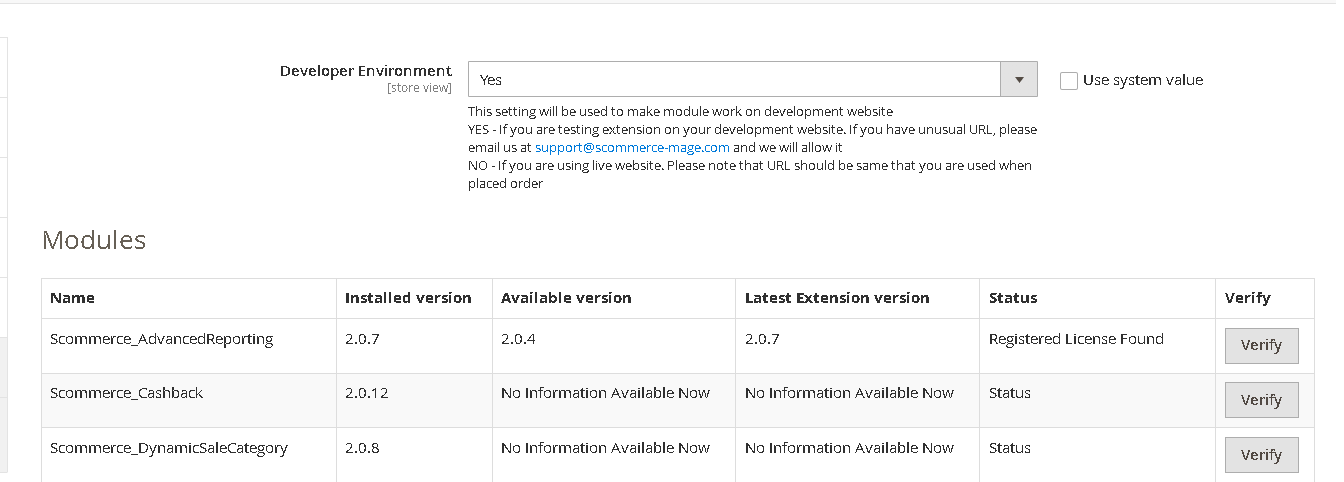
Once added go to Stores>Configuration>Scommerce Configuration>Core and click on verify. Once verified the license will start working on your staging site.
Q. Can I test the extension before buying?
A. Unfortunately we can't provide you extension for testing purposes but we have demo available for most of our extensions and happy to provide full refund if the extension doesn't work
Q. Can I request for customisation on your extensions?
A. Yes we do provide all sort of customisation for our clients at the reasonable rates. And if we believe the customisation will help our product then we also provide great discount on the customisation
Q. I have multiple websites/stores, each with a unique domain. Do I need a separate license key for each live domain?
A. Yes, each live domain requires its own license key. Our license keys are URL specific and each live domain, subdomain, subfolder requires a separate key. If you’re running multiple websites from the same Magento instance, we offer a 30% discount when purchasing license keys for two or more domains in a single order. To receive a coupon code, please contact us at support@scommerce-mage.com.
Q. How can I upgrade my extension to the latest version?
A. If your extension is within the free upgrade period (12 months from purchased date) then simply email us with your order number and our team will send you the latest version of the extension but if it is outside free upgrade period then you need to buy an upgrade using the following link
https://staging.scommerce-mage.com/magento-extension-installation-service.html
Once you received the latest version of our extension then we would highly recommend to delete all the files and folder of our extension from your website first before uploading the latest version because we might have removed existing files and keeping existing files could cause problems on your website.
https://staging.scommerce-mage.com/magento-extension-installation-service.html
Once you received the latest version of our extension then we would highly recommend to delete all the files and folder of our extension from your website first before uploading the latest version because we might have removed existing files and keeping existing files could cause problems on your website.
Q. Does my license get expired after certain period?
A. No, your license is not going to get expired but we would highly recommend upgrading to get all the latest fixes (including security fixes if any), improvements and new features. In the upgrade, we also ensure it is compatible with the latest version of Magento and when you upgrade you will have a smooth transition.
Q.Where can I download the extension files?
A. Please login into your account on our website and go to the download link under my account section to download the extension package.
Q.Can you provide a key that works for our development (NOT PRODUCTION) environment which will work on a dynamic URL, for example, 12334.gitpod.com and 4567.gitpod.com?
A. Unfortunately it is not possible to generate license keys based on the dynamic URLs.
License keys need to be generated per domain or subdomain whether it is production or non-production.
Q. How can I manually uninstall your module?
A. Please follow the below steps -:
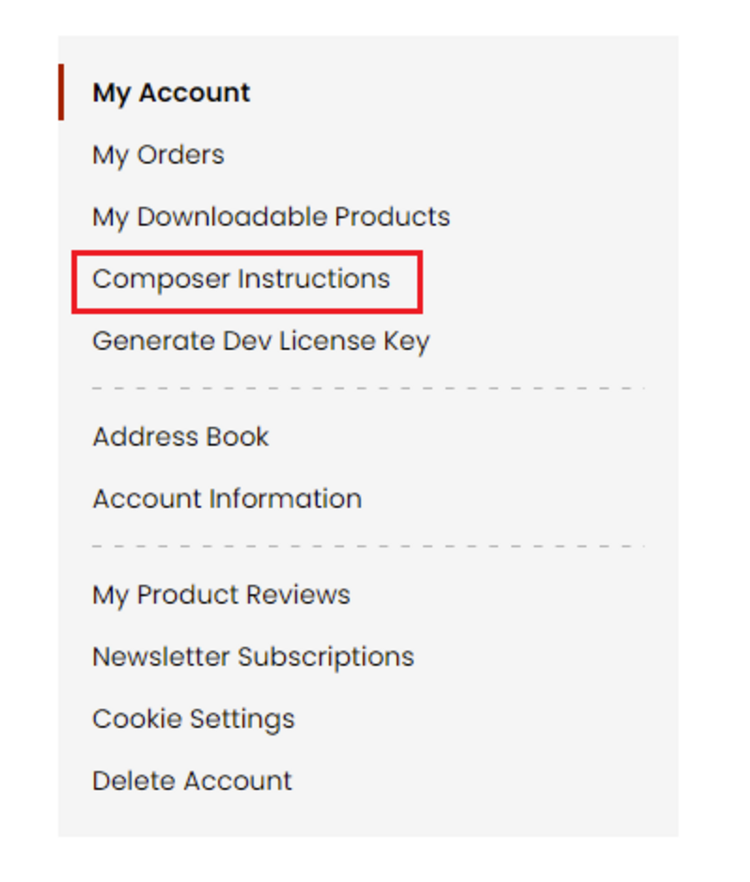
Step 1: Navigate to our store and login to your account. Then go to the My Account Section, on the left menu click on Composer Instructions.
 Step 2: Next, run the config commands shown on the top of the page then click on the extension that you want to install. A composer require command will be revealed in the dropdown menu. Run the command then clear caches to complete the installation.
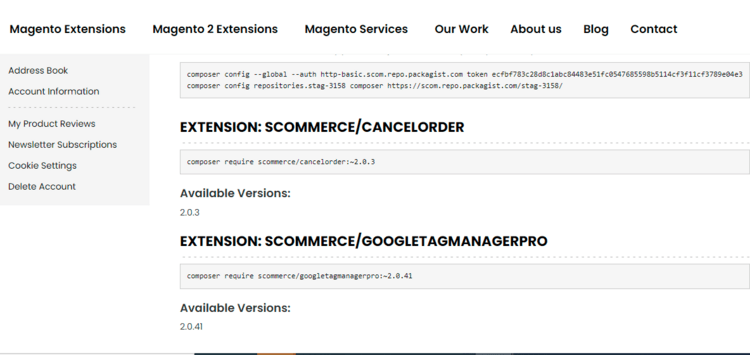
Step 2: Next, run the config commands shown on the top of the page then click on the extension that you want to install. A composer require command will be revealed in the dropdown menu. Run the command then clear caches to complete the installation.
Q. Do you support SPA (Single Page Application) / PWA (Progressive Web Application) / AMP ?
A. Unfortunately, we don’t support SPA or PWA or AMP but we may be supporting them in future depending upon the demand.
Change Log
Version 2.0.2
2026-04-21 09:17:32
Version 2.0.1
2026-02-04 10:37:34
- Add compatibility for PHP 7.x and Magento 2.3.x.
- Fixed issues with crons
- Improved the consistency of linking TTS orders with Magento orders
- Fixed issues related to shipment inventory source
- Fixed issues with crons
- Improved the consistency of linking TTS orders with Magento orders
- Fixed issues related to shipment inventory source
Version 2.0.1
2026-02-04 10:37:34
- Add compatibility for PHP 7.x and Magento 2.3.x.
- Fixed issues with crons
- Improved the consistency of linking TTS orders with Magento orders
- Fixed issues related to shipment inventory source
- Fixed issues with crons
- Improved the consistency of linking TTS orders with Magento orders
- Fixed issues related to shipment inventory source
Version 2.0.0
2025-11-25 13:23:15
Initial Release
Show More
Show Less
Reviews
Write Your Own Review
You may also like
- Magento 2Breeze
 Magento 2 Product Shelf LifeOrganize your products by batch based on shelf-life / expiry date with our Magento 2 Product Shelf L...£249.99
 - Magento 2Breeze Magento 2 Order Delete or ArchiveEnhance the default Magento 2 order grid with the functionality to delete or archive orders. Easily ...£124.99
- Magento 2Breeze Magento 2 VAT ExemptionMagento 2 VAT Exemption extension allows Magento 2 store owners to sell products under VAT exemption...£124.99
- Magento 2Breeze Magento 2 Associated or Linked Product Stock UpdateManage the stock for Associated or Linked product with our Magento 2 Associated or Linked Product St...£154.99
- Magento 2 Magento 2 Repeat OrderSubscribe for repeat / recurring order with our Magento 2 Repeat Order Extension. It is a fully-feat...£299.99
- Magento 2 Magento 2 Google Page Speed OptimiserGoogle PageSpeed Insights(specially mobile) is an official Google ranking factor since mid 2018. Pe...£149.00




- Added the ability to manually assign specific TikTok categories to products to prevent sync rejections. The system will use manual assignments first, falling back to automated recommendations only if unassigned
- Implemented an automatic check during the product save process. If product dimensions (height, width, etc.) are invalid for TikTok, a warning message is displayed immediately to the admin
- Added the functionality to test API credentials and refresh access tokens directly from the Configuration panel, removing the requirement for CLI commands
- Implemented support for partial refunds and upgraded the core logic for processing order cancellations and full refunds