

In magento, the whole page is distributed with so many small blocks and elements. Sometime it is very difficult to know which block the content is getting loaded from. Even for more experienced developers this applies because of magento’s override template feature.
As any of the custom module can override the existing magento default templates.And sometimes it is difficult to identify where the block is rendering from or which pthml or block class is getting used for particular content on the page.
The great thing is that magento has given a great feature to identify these blocks and their associated template.
You can enable template path hint from
admin -> system -> configuration -> advanced -> debug-> template path hints -> yes (make sure you choose website or store scope)
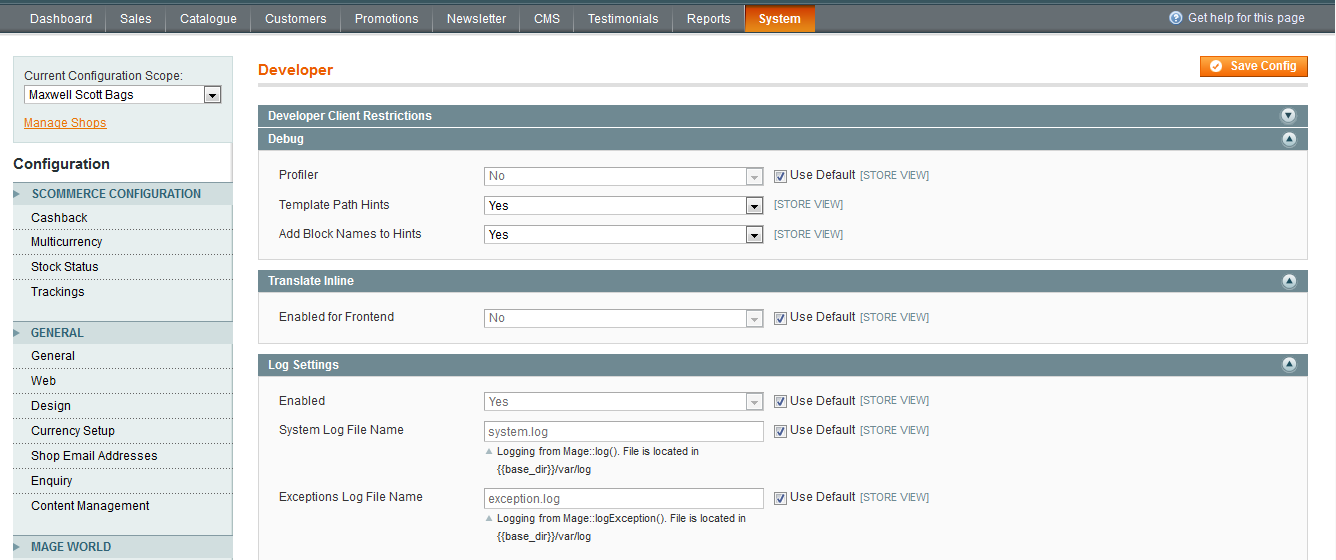
Once you have enabled template path hints for the frontend, it should show all the template paths for each and every block on the frontend of the website for all pages.
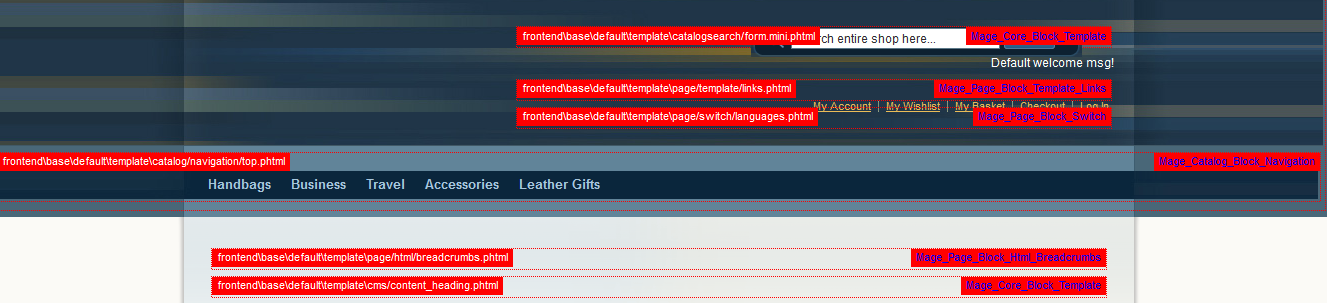
In the above screenshot, you can see the template path as well as block names which can again be enabled using the system configuration from
admin -> system -> configuration -> advanced -> debug-> add block names to hints -> yes (make sure you choose website or store scope)
This way you can easily identify the phtml file and block classes used for rendering each and every individual blocks on the page.
N.B – Make sure that you don’t do this on production as this will be shown to all the customers. Even though you can restrict the rendering of these hints by developer’s IP address but we would still recommend to use this only on development server.
Hope this article helped you in some way. Please leave us your comment and let us know what do you think?


I do trust all of the ideas you’ve presented to your post. They are very convincing and can certainly work. Still, the posts are too quick for beginners. Could you please lengthen them a bit from subsequent time? Thank you for the post.
I gotta favorite this web site it seems very beneficial invaluable
Thanks for your site to update everyone on the subject. Please understand that if a new position becomes available, or any change in the article appear on the current events, I will read and talk about how to make your good use of these methods. This web site is provided thanks to your efforts and others to consider.
Great article, just what I was looking for.
I simply want to mention I’m newbie to blogging and site-building and absolutely liked you’re web page. More than likely I’m want to bookmark your blog . You certainly come with incredible well written articles. Many thanks for revealing your website page.
You definitely come with good stories. Many thanks for revealing your website.
Thanks for your data.I’ve Bookmarked this site will confident come back.
You have made some good points there. I looked on the net for more info about the issue and found most people will go along with your views on this website.
Howdy! I just want to give you a big thumbs up for the excellent information you have got here on this post. I will be returning to your blog for more soon.
Good day! I could have sworn I’ve visited this website before but after browsing through many of the posts I realized it’s new to me. Anyways, I’m certainly happy I came across it and I’ll be book-marking it and checking back frequently!
You surely have incredible articles. Thanks a lot for sharing with us your website.
Are you sure about this path?
You can enable template path hint from
admin -> system -> configuration -> advanced -> debug-> template path hints -> yes
I think template path hints under developer section.
Also i want help in
How to enable template path hints for admin
Thanks in advance