Skype us at scommerce.mage or call +44(0)1483 487746

Magento 2 Distance Based Shipping
£89.99
Compatible with Magento 2 community and enterprise 2.3.3 - 2.4.x including cloud edition
Unlock powerful, location-aware delivery options with Magento 2 Distance-Based Shipping. Using the Google Maps API, this extension automatically calculates the distance between your store and the customer to dynamically show, hide, or price shipping methods. Restrict "Free Local Delivery" to a specific radius, or create multiple tiered shipping rates based on distance (e.g., Standard, Express, and Premium). Automate your logistics, protect your margins, and provide a transparent, location-based checkout experience.
-
Restrict Shipping by Distance: Hide any native Magento shipping method (Free Shipping, Flat Rate) if the customer's address is outside your defined maximum delivery distance (in miles or KM).
-
Create Dynamic Distance Rates: Build your own shipping method with unlimited, flexible tiers based on distance ranges (e.g., 0-5 miles = £5, 5-15 miles = £10).
-
Google Maps API Integration: Ensures hyper-accurate, real-time distance calculations using the reliable Google Maps Distance Matrix API.
-
Flexible Origin Address: Source your store's location from Magento Shipping (MSI), your general store configuration, or by manually entering precise latitude/longitude coordinates.
-
Fixed & Percentage Costs: Set shipping costs as a flat fee or as a percentage of the cart subtotal for ultimate flexibility.

Free Support
up to 60 days

Free Upgrades
up to 1 year

Fully open source
Product description
Magento 2 Distance Based Shipping
Compatible with Magento 2 community and enterprise 2.3.3 - 2.4.x including cloud edition
Standard Magento shipping methods fall short when your business operates within a physical delivery area. Offering "Free Local Delivery" can quickly become unprofitable when orders come from miles outside your intended zone. The Magento 2 Distance-Based Shipping extension solves this problem by seamlessly integrating Google Maps intelligence directly into your checkout process.
This powerful tool offers two core functionalities in one. First, it acts as a gatekeeper for your existing shipping methods. Define a simple distance threshold (e.g., 15 miles), and the extension will automatically hide selected methods like "Free Shipping" for any customer located beyond that radius. Stop manually checking addresses and prevent margin loss on long-distance deliveries.
Second, it empowers you to create a fully-featured, dynamic shipping method with sophisticated, tiered rates. Build unlimited delivery zones based on distance ranges, each with its own title, cost, and availability. Offer a "Standard" rate for customers within 5 miles and an "Express" rate for those 5-20 miles away. This allows you to accurately reflect your true delivery costs and provide customers with transparent, fair, and flexible shipping options.
Who Is This Extension For?
This extension is a must-have for any Magento merchant with a physical component to their fulfillment, especially:
Restaurants & Food Delivery: Offer free delivery within a 3-mile radius and tiered pricing for suburbs further away.
Florists & Gift Shops: Ensure "Same-Day Local Delivery" rates are only offered to customers you can realistically serve on time.
Furniture & Large Goods Retailers: Accurately charge for delivery based on distance, reflecting the true cost of fuel and time for large items.
Local Grocery or Farm Box Services: Define precise delivery zones and prevent orders from outside your serviceable area.
Retailers with "In-House Courier" Services: Manage your own delivery fleet and costs by creating a shipping model that mirrors your operational boundaries.
Restrict Shipping Methods by Maximum Distance
Gain complete control over who can access your special delivery rates. This feature is perfect for businesses offering local perks that need to be geographically contained.
Define a Simple Radius: Set a single "Maximum Distance" (in miles or KM) to create a delivery boundary around your store.
Select Methods to Restrict: From a multi-select list, choose which of your existing shipping methods should be governed by this rule (e.g., Free Shipping, Store Pickup, Flat Rate).
Automated Hiding Logic: If a customer's shipping address is calculated to be outside the allowed distance, the selected methods are automatically hidden from the checkout page. No manual intervention needed.
Protect Your Margins: Confidently offer "Free Local Delivery" knowing it will only be available to truly local customers, preventing costly long-distance shipments.
Create Dynamic, Tiered Shipping Rates Based on Distance
Go beyond simple restrictions and build a sophisticated shipping model that aligns with your operational costs. Create your own custom shipping method with unlimited pricing tiers.
Unlimited Delivery Zones: Configure any number of distance ranges (e.g., 0-5 miles, 5.1-15 miles, 15.1-30 miles), each with unique settings.
Custom Title & Cost Per Zone: Assign a unique title (e.g., "Standard Local," "Extended Zone") and a specific cost to each distance range.
Flexible Cost Calculation: Set the cost for each tier as a Fixed flat rate or as a Percentage of the order subtotal.
Clear Customer Communication: If a customer is outside all defined ranges, you can either hide the method entirely or display a custom error message (e.g., "Delivery is not available for your location.").
Geographic Targeting: Restrict your dynamic shipping method to specific countries, ensuring it only appears for relevant customers.
Powered by Google Maps & Built for Flexibility
At the core of the extension is a robust integration with the Google Maps API, providing accuracy and reliability.
Accurate Distance Calculation: Leverages the Google Maps Distance Matrix API for precise, real-time distance calculation between your store and the customer.
-
Multiple Origin Sources: Define your store's "from" address with unmatched flexibility:
Magento Shipping (MSI): Automatically uses the address configured for your MSI source (perfect for multi-warehouse setups).
General Store Information: Uses the default address in your core Magento configuration.
Manual Lat/Long: Enter the exact latitude and longitude for pinpoint accuracy.
Intelligent API Fail-Safe: If the Google Maps API key is invalid or fails to respond, the extension logs the error and defaults to showing all shipping methods. This critical feature ensures your checkout is never blocked due to a third-party service issue.
Secure & Permission-Based: Access to the extension's configuration is controlled by Magento's native ACL, so only authorised admin roles can make changes.
Main Features of Magento 2 Distance Based Shipping
Two Core Modes: Choose to either (1) restrict your existing Magento shipping methods by distance or (2) create a new, fully dynamic distance-based shipping method.
Restrict by Maximum Distance: Set a single delivery radius (in miles or KM) to automatically hide specific shipping methods (e.g., Free Shipping) for customers outside that zone.
Dynamic Tiered Rates: Build your own shipping method with unlimited delivery zones based on distance ranges (e.g., 0-5 miles, 5.1-15 miles).
Flexible Costing Per Tier: Assign a unique shipping cost to each distance tier, configurable as a Fixed flat rate or as a Percentage of the cart subtotal.
Google Maps API Integration: Utilises the Google Maps Distance Matrix API for accurate, real-time driving distance calculations.
-
Flexible Origin Address: Source your store's location from three different options:
Magento Shipping (MSI) Source Address
General Store Information Address
Manually Entered Latitude & Longitude
Custom Naming & Messaging: Define unique titles for each shipping tier (e.g., "Standard Local Delivery") and custom error messages for out-of-range customers.
Country-Specific Restrictions: Limit the availability of your distance-based shipping method to specific countries.
Intelligent API Fail-Safe: If the Google Maps API is unavailable, the extension defaults to showing all shipping methods to prevent a broken checkout, ensuring you never lose a sale.
Choice of Units: Configure all distance calculations and thresholds to use either Miles or Kilometers.
Admin Sort Order: Control the display order of your custom shipping methods on the checkout page.
ACL Controlled Configuration: Access to the extension's settings is managed by Magento's native Access Control List (ACL) for enhanced security.
Compatible with Magento 2 community and enterprise 2.3.3 - 2.4.x including cloud edition
We offer 60 days of free support and 12 months of free upgrade for any standard Magento site when you buy this extension. You can also get our installation service for a small fee. If you want more benefits, you can purchase our 12 months of free premium support and free lifetime upgrade package. Please contact us if you need any assistance or customization for this extension. We will reply to you within 48 hours. We may also offer you a special deal or a free solution if we like your idea.
** Please refer to our FAQ or T&C section for running our extensions on multiple domains or sub-domains
FAQ
Frequently Asked Questions
Q. How is this different from Magento's built-in Table Rates?
A. Table Rates are based on static rules like Postcode, Weight, or Price. Our extension is truly dynamic, using the Google Maps API to calculate the *actual driving distance* to the customer's address. This is far more accurate for defining local delivery zones than relying on large postal code areas.
Q. Do I need a Google Maps API key to use this extension?
A. Yes. The extension requires a valid Google Maps Distance Matrix API key to calculate the distance between your store and the customer. You can generate one from the Google Cloud Platform Console. This ensures you get accurate, reliable data.
Q. What happens if the Google Maps API fails or my key is wrong? Will it break my checkout?
A. No. We've built in a critical fail-safe. If the API cannot be reached, the extension will log the error and default to showing all shipping methods. This ensures that your checkout process is never blocked and you can continue to take orders.
Q. Can I use this to restrict my existing "Free Shipping" method to a 10-mile radius?
A. Absolutely. This is a primary use case. You would simply set the "Maximum Distance" to 10, select "Free Shipping" from the list of methods to restrict, and the extension will handle the rest automatically.
Q. Can I set up multiple delivery zones, like 0-5 miles for £5 and 5-15 miles for £10?
A. Yes. This is the "dynamic rate" functionality. You can create an unlimited number of tiers, each with its own "Distance From," "Distance To," title, and cost, allowing you to build a sophisticated and fair shipping cost structure.
Q. How does the extension know my store's location for the calculation?
A. You have three flexible options. You can configure it to use the address from your Magento Shipping (MSI) source, the default address in your store's information settings, or you can enter a precise latitude and longitude manually for pinpoint accuracy.
Q. How can I get license key for my development website?
A. Please use the same license as live site provided with the order confirmation email on the staging site and ensure you have the latest version of scommerce/core installed i.e 2.0.9.
Once added go to Stores>Configuration>Scommerce Configuration>Core and click on verify. Once verified the license will start working on your staging site.
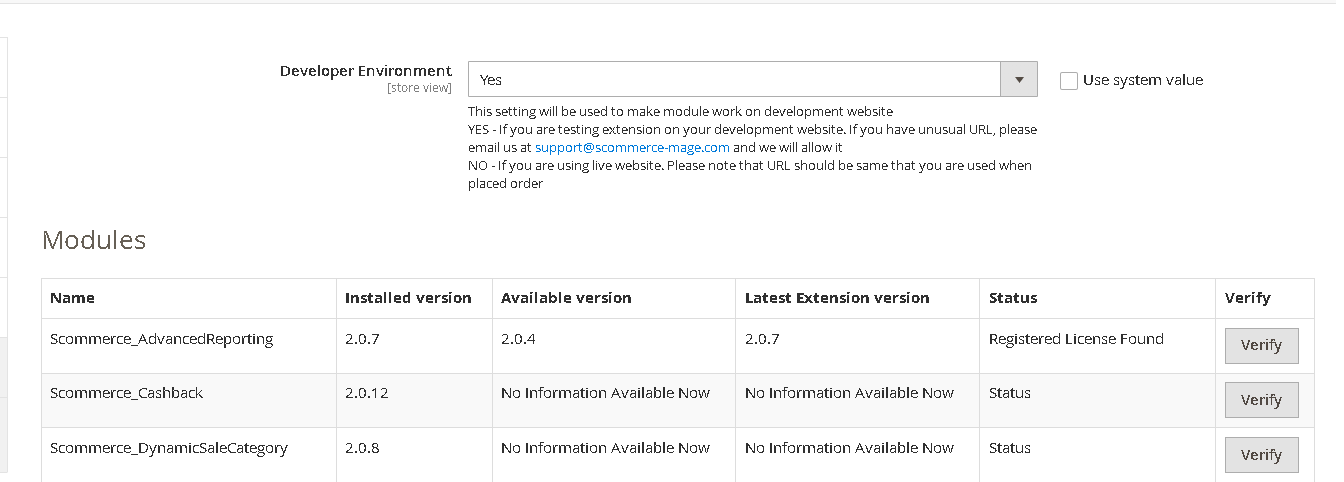
Once added go to Stores>Configuration>Scommerce Configuration>Core and click on verify. Once verified the license will start working on your staging site.
Q. Can I test the extension before buying?
A. Unfortunately we can't provide you extension for testing purposes but we have demo available for most of our extensions and happy to provide full refund if the extension doesn't work
Q. Can I request for customisation on your extensions?
A. Yes we do provide all sort of customisation for our clients at the reasonable rates. And if we believe the customisation will help our product then we also provide great discount on the customisation
Q. I have multiple websites/stores, each with a unique domain. Do I need a separate license key for each live domain?
A. Yes, each live domain requires its own license key. Our license keys are URL specific and each live domain, subdomain, subfolder requires a separate key. If you’re running multiple websites from the same Magento instance, we offer a 30% discount when purchasing license keys for two or more domains in a single order. To receive a coupon code, please contact us at support@scommerce-mage.com.
Q. How can I upgrade my extension to the latest version?
A. If your extension is within the free upgrade period (12 months from purchased date) then simply email us with your order number and our team will send you the latest version of the extension but if it is outside free upgrade period then you need to buy an upgrade using the following link
https://staging.scommerce-mage.com/magento-extension-installation-service.html
Once you received the latest version of our extension then we would highly recommend to delete all the files and folder of our extension from your website first before uploading the latest version because we might have removed existing files and keeping existing files could cause problems on your website.
https://staging.scommerce-mage.com/magento-extension-installation-service.html
Once you received the latest version of our extension then we would highly recommend to delete all the files and folder of our extension from your website first before uploading the latest version because we might have removed existing files and keeping existing files could cause problems on your website.
Q. Does my license get expired after certain period?
A. No, your license is not going to get expired but we would highly recommend upgrading to get all the latest fixes (including security fixes if any), improvements and new features. In the upgrade, we also ensure it is compatible with the latest version of Magento and when you upgrade you will have a smooth transition.
Q.Where can I download the extension files?
A. Please login into your account on our website and go to the download link under my account section to download the extension package.
Q.Can you provide a key that works for our development (NOT PRODUCTION) environment which will work on a dynamic URL, for example, 12334.gitpod.com and 4567.gitpod.com?
A. Unfortunately it is not possible to generate license keys based on the dynamic URLs.
License keys need to be generated per domain or subdomain whether it is production or non-production.
Q. How can I manually uninstall your module?
A. Please follow the below steps -:
Step 1: Navigate to our store and login to your account. Then go to the My Account Section, on the left menu click on Composer Instructions.
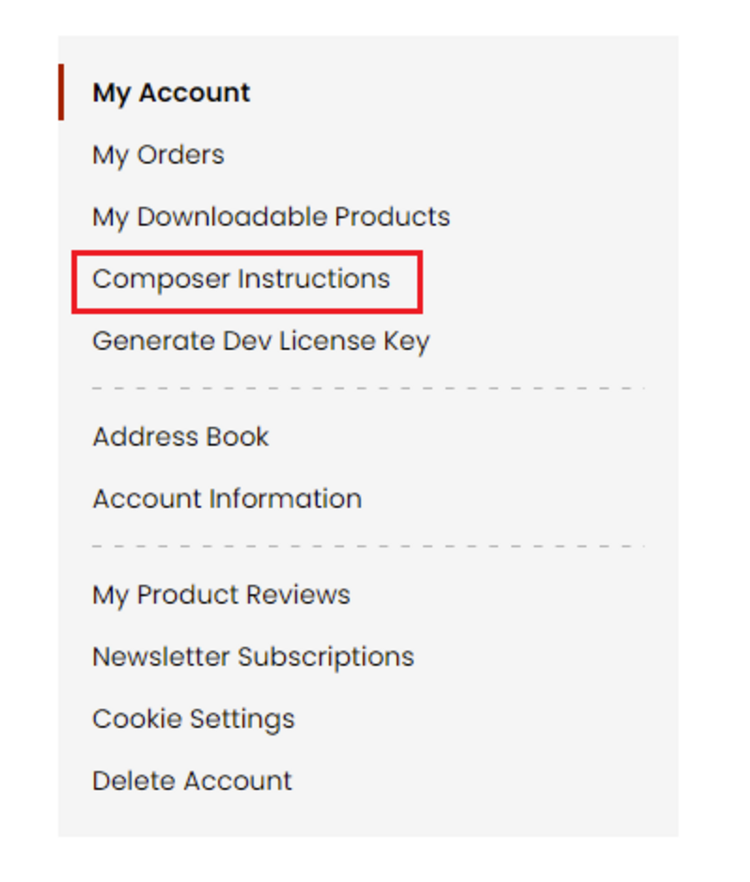 Step 2: Next, run the config commands shown on the top of the page then click on the extension that you want to install. A composer require command will be revealed in the dropdown menu. Run the command then clear caches to complete the installation.
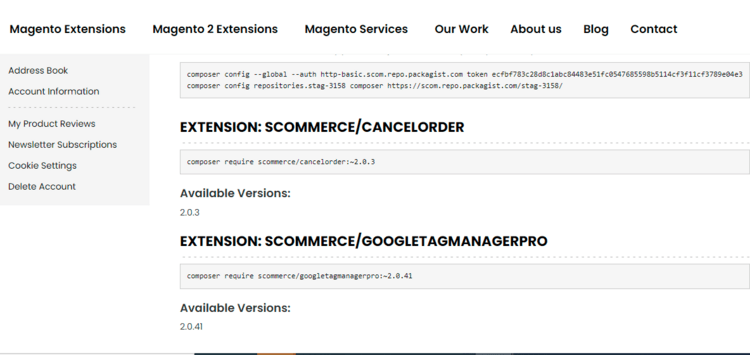
Step 2: Next, run the config commands shown on the top of the page then click on the extension that you want to install. A composer require command will be revealed in the dropdown menu. Run the command then clear caches to complete the installation.
Q. Do you support SPA (Single Page Application) / PWA (Progressive Web Application) / AMP ?
A. Unfortunately, we don’t support SPA or PWA or AMP but we may be supporting them in future depending upon the demand.
Change Log
Version 2.0.0
2025-08-15 08:38:29
Initial Release
Reviews
Write Your Own Review