Skype us at scommerce.mage or call +44(0)1483 487746


Magento 2 Security Suite
£199.99
Compatible with Magento 2 community and enterprise 2.3.3 - 2.4.x including cloud edition
Elevate the security of your Magento 2 store with our comprehensive Magento 2 Security Suite. Designed to fortify your store's defences, this suite combines three powerful modules: Advanced Admin Login Security, Security Checklist, and Admin Action Log. With features such as User approval system, IP restriction, ReCAPTCHA integration, and detailed admin activity logging, our suite provides proactive defence against common security threats.
- Advanced Admin Login Security
- Admin lockout on failed attempts
- User approval system with Blacklist and Whitelist feature
- Security Checklist for comprehensive protection with checks such as ReCaptcha, password strength, database, security patches and more.
- Admin Action/Activity Log for detailed monitoring
- Proactive defence against common security threats with one comprehensive security suite

Free Support
up to 60 days

Free Upgrades
up to 1 year

Fully open source
Product description
Magento 2 Security Suite
Compatible with Magento 2 community and enterprise 2.3.3 - 2.4.x including cloud edition
Protecting your Magento 2 store from potential security threats is paramount in today's digital landscape. Our Magento 2 Security Suite offers a comprehensive solution, combining three powerful modules to fortify your store's defences and ensure peace of mind.
Our Magento 2 Security Suite addresses the unique security challenges faced by ecommerce stores, offering proactive defense mechanisms to mitigate potential risks. By combining three essential modules – Advanced Admin Login Security, Security Checklist, and Admin Action Log – our suite provides comprehensive protection against a wide range of security threats.
Why Choose Magento 2 Security Suite?
Comprehensive Protection: Our suite combines multiple modules to offer comprehensive protection against a wide range of security threats.
Proactive Defense: With proactive measures such as two-factor authentication and security checklists, you can stay ahead of potential security vulnerabilities.
Enhanced Monitoring: Gain visibility into admin activities with detailed logs and monitoring capabilities, ensuring accountability and compliance.
Peace of Mind: With our Magento 2 Security Suite, you can rest assured that your store is equipped with the necessary defenses to withstand common security threats, ensuring the integrity and trustworthiness of your online business.

Advanced Admin Login Security
Enhance the security of your Magento 2 admin panel with the Advanced Admin Login Security feature included in our comprehensive Magento 2 Security Suite. From automated admin lockouts on failed attempts to customizable IP whitelisting and blacklisting, this feature provides a robust suite of security measures. Receive real-time email notifications, maintain detailed logs, and reset blacklist records for a secure and stress-free admin experience. Elevate your security measures and fortify your Magento 2 store with confidence as part of our integrated Security Suite.
Security Checklist
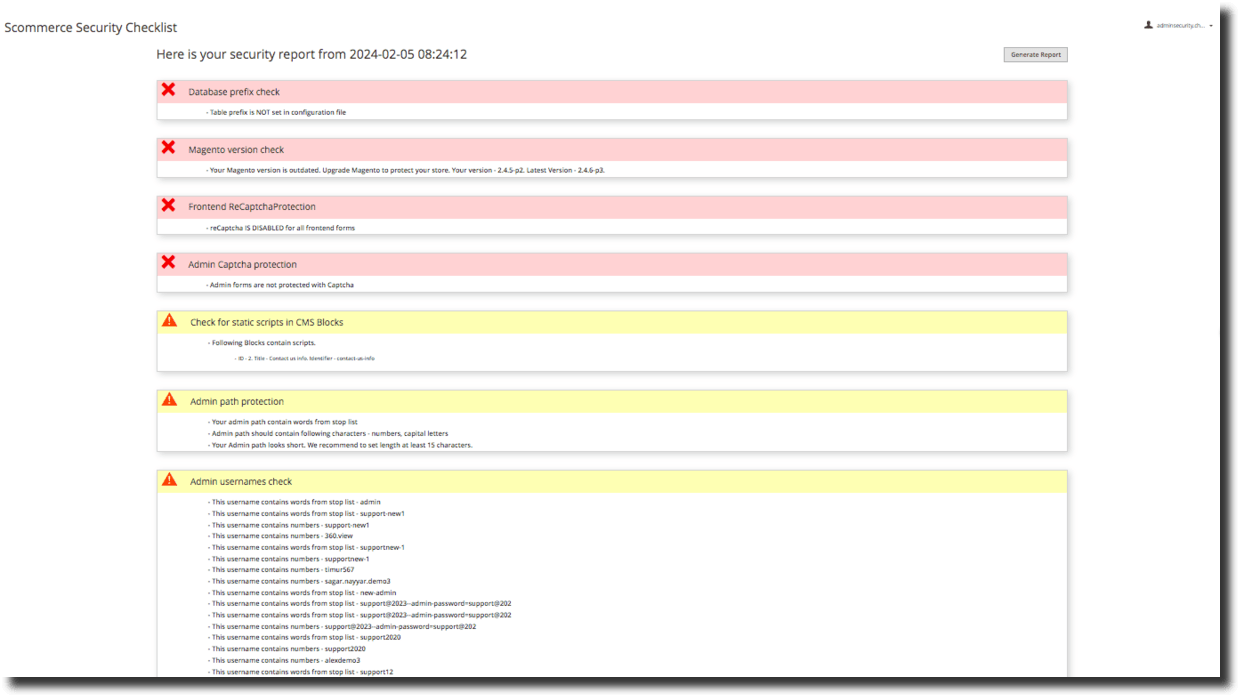
Integrated seamlessly into our comprehensive suite, this feature offers real-time insights, dynamic visual cues, and relentless surveillance, elevating your store's defenses against potential vulnerabilities. Encompassing pivotal checks including ReCAPTCHA integration, Database Prefix validation, meticulous Admin Credentials scrutiny, rigorous Magento Version assessments, and meticulous Security Patches validations, our solution empowers you to fortify your store's security effortlessly. Boasting a user-centric interface and a proactive approach, it equips you with indispensable features such as a Real-time Security Dashboard Widget, Visual Indicators for swift identification of passed or failed checks, a comprehensive Summary with Security Score Percentage, Frontend and Backend Captcha Checks, a robust Database Prefix Alert and Notification system, Admin Username and Password Strength Display, meticulous Magento Version and Security Patches Verification, and flexible options for both Manual and Scheduled Security Checks.
Admin Action Log
Gain comprehensive oversight of administrative activities within your Magento 2 store with the Admin Action Log feature, an integral part of our Magento 2 Security Suite. This module meticulously records and monitors crucial admin actions such as login attempts, configuration changes, and product modifications, providing invaluable insights into potential security breaches or suspicious behavior.
As a core component of our comprehensive suite, this module empowers you with detailed logs and robust reporting capabilities, enabling you to track user actions, identify security risks, and implement necessary measures to mitigate them effectively. With real-time monitoring functionality and instant alerts, you can maintain constant vigilance over activities within your store's admin panel, ensuring continuous security monitoring and safeguarding the integrity of your Magento 2 store.
Advanced Admin Login Security
- User Approval System
- IP restriction(Blacklist/Whitelist) capabilities to limit access
- Password strength enforcement for secure credentials
- Customizable security settings for tailored login process
Security Checklist
- Step-by-step guidance for implementing essential security measures
- ReCAPTCHA integration to prevent automated attacks
- Database prefix verification for enhanced database security
- Admin credentials strength assessment for robust authentication
- Magento version checks to ensure up-to-date security patches
Admin Action Log
- Detailed logging of admin actions for accountability
- Real-time monitoring and alerts for suspicious activities
- Reporting capabilities to track user actions
- Enhanced visibility into admin activities for improved security monitoring
The main highlights of the module are-:
- Toggle advanced login security features from the Magento admin panel.
- Set thresholds for failed login attempts, automatically locking out admin IP addresses, and receive notifications for added security.
- Customize IP blacklist and whitelist settings, including country-wise restrictions on the admin panel login page.
- Tailor the duration of IP address blacklisting after exceeding failed login attempts.
- Real-time email notifications for lockout events, with customizable link validity time for approval or denial of login attempts.
- Effortlessly reset and manage blacklist records, including country-wise blacklist implementation.
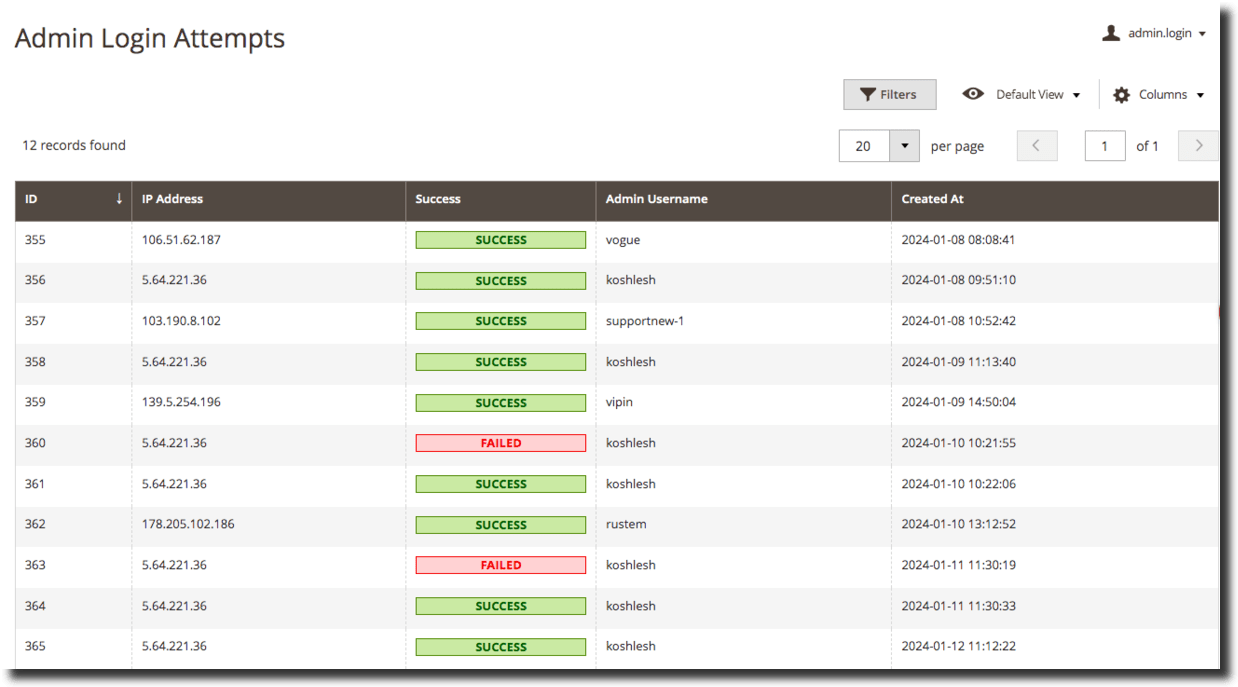
- Detailed logs of all login attempts, successful or failed, including date, time, IP address, username, and login status.
- Edit or delete IP addresses from the whitelist or blacklist at any time.
- Complete disablement option from configurations.
- Multi-store environment support.
- User-friendly interface for easy installation and management.
- Real-time Security Dashboard Widget: Immediate insights into store security status at a glance.
- Comprehensive Checks: Cover critical aspects including ReCAPTCHA, Database Prefix, Admin Credentials, Magento Version, and Security Patches.
- Visual Indicators: Easily identify the status of each check with green check marks for passed checks and red cross marks for failed ones.
- Summary with Security Score Percentage: Summarized overview, including the number of passed and failed checks, with calculated security score percentage.
- Frontend and Backend Captcha Checks: Verify both frontend and backend Captcha settings against automated attacks.
- Database Prefix Alert and Notification: Identify potential security risks related to the absence of a database prefix and receive alerts for timely action.
- Admin Username and Password Strength Display: Evaluate and promote strong security practices for admin usernames and passwords.
- Magento Version and Security Patches Verification: Confirm store runs the latest Magento version and check for installed security patches, with a convenient "Contact Us" button for assistance.
- Links, Tool Tips, and Guides for Detailed Recommendations: Access additional insights and recommendations for each security check with provided links, tooltips, and comprehensive guides.
- Manual and Scheduled Security Checks: Choose to run security checks manually or schedule them for automated runs at specified intervals using cron jobs.
- Log every login attempt to Magento backend, including IP address.
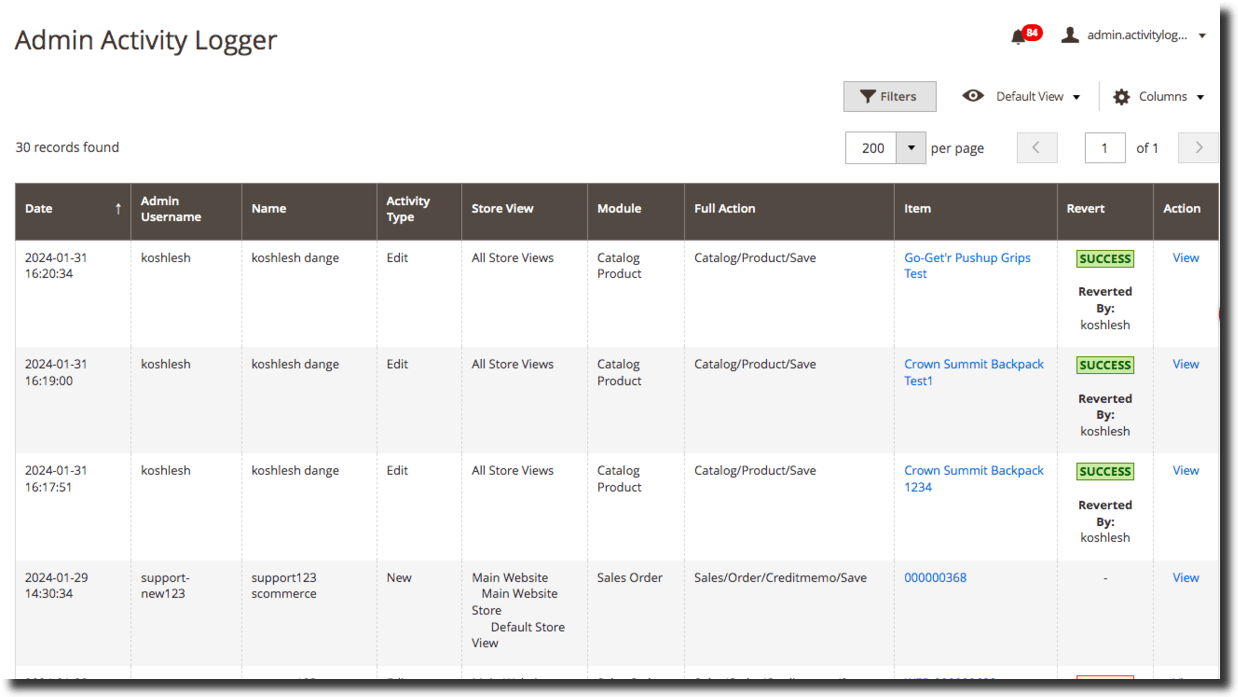
- Track product changes, configuration changes, category changes, sale/order/credit memos/shipping changes, changes made to newsletter subscriber list, and all Mass actions like delete/cancel/update.
- Restore incorrect actions and track login actions in individual grid.
- Record if login attempt was a success or failure, and log all information for every login/logout attempt like Date and Time, Login/Logout action, IP address, User Name, Browser, Browser Version, Platform, and Device.
- Track all actions performed by the user while logged into backend, including actions on custom added admin areas/third-party extensions.
- Easily view details of each action performed from the grid.
- Compare values before and after changes, with full control over all admin activities.
- Manage log cleanup period from configurations, ensuring efficient log management.
We offer 60 days of free support and 12 months of free upgrade for any standard Magento site when you buy this extension. You can also get our installation service for a small fee. If you want more benefits, you can purchase our 12 months of free premium support and free lifetime upgrade package. Please contact us if you need any assistance or customization for this extension. We will reply to you within 48 hours. We may also offer you a special deal or a free solution if we like your idea.
** Please refer to our FAQ or T&C section for running our extensions on multiple domains or sub-domains
FAQ
Frequently Asked Questions
Advanced Admin Login Security
Q. If the IP is both blacklisted and whitelisted, which one will be given priority?
If your IP is whitelisted and blacklisted, then the blacklist will take precedence.
Q. Can we set the login attempt limit for the Lockout and Blacklist actions?
A. Yes, you can. There is a configuration called 'Failed Attempts Limit' available to set the attempt limit. If the limit is exceeded, the account will be either locked out or blacklisted as per the configuration.
Q. Can we set the failed attempts limit to be greater than the default Magento limit?
A. No, the IP will remain blocked/blacklisted until the ‘Valid till' time limit. The 'Valid till' limit can be defined by the configuration 'Locked out period (in hours)'.
Q. Is the IP permanently blocked once it's blacklisted?
A. The IP will stay blocked forever until it is manually removed.>
Q. Can we restrict users based on their country ?
A. Yes, you can. Users can be blocked from one or multiple countries by selecting the 'Allowed countries' option from the configuration. If no country is selected, all countries are allowed.
Q. When the IP is locked out or blacklisted, does it send emails to users?
A. Yes, it does send.
Q. Can IP be whitelisted on request or manually?
A. If the whitelist IP configuration is enabled, the user cannot log in until the IP is manually whitelisted or if they approve or deny the login via the link received in the email.
Magento 2 Security Checklist
Q. What are the criteria for getting a warning, error, and success message for various checks?
We have several distinctions for various checks:
- For Admin password protection, if a password change is not forced, the user will see an error. If the lifetime is more than 90 days, the user will see a warning. If a password change is forced and the lifetime is less than 90 days, then the user will see success.
- For a Magento version check, if the version is outdated, the user will see an error. Otherwise, the user will see success.
- For the Database prefix check, if the table prefix is not set in the configuration file, the user will see an error. Otherwise, the user will see success.
- For Frontend ReCaptchaProtection, if all frontend forms are protected with Recaptcha, the user will see a success. When some forms are protected, the user will see a warning. If none of the forms are protected, the user will see an error.
- For Admin Captcha protection, if all backend forms are protected with Captcha, the user will see a success. When some forms are protected, the user will see a warning. If none of the forms are protected, the user will see an error.
- For Admin path protection, if the user's admin path doesn't contain words from the stop list, doesn't contain numbers or capital letters, and is at least 15 characters long, the user will see success. If any of the criteria mentioned are not fulfilled, the user will see a warning.
- For Admin usernames check if the username contains words from the stop list or if the username contains numbers, the user will see a warning. Otherwise, success.
- For Admin admin user activity check, if the account is unused, the user will see a warning. Otherwise, success.
- For Static scripts in Configuration, CMS Blocks, and CMS Pages, if a text field has a static script, the user will see a warning. Otherwise, success.
Q. What is the difference between generating a security report using cron schedule and without using cron schedule?
A. If the user wants to generate a report without using a cron job, click on "Generate Report." Otherwise, wait for the cron job to run and refresh the page. The user would see a new report.
Q. On what basis are we seeing the percentage protected below the report?
A. If we have ten fields enabled in our security checklist, out of which 2 are showing success, 3 are showing warning, and 5 are showing error, then our calculation will go as follows: number of fields showing success/total number of enabled fields *100.
Q. Why are the frontend and backend Repcaptcha fields still showing success even when I enter incorrect keys?
A. It is impossible for our module to check if keys are valid or not; however, if you insert incorrect keys, there is a high possibility you will not be able to fully use the website, as you will not be able to submit forms. So there is no point in just setting the captcha as enabled to bypass the checklist checker; the website will not be functional.
Admin Action Log
Q. Can I check the demo site's backend?
A. Sure – Please email at core@scommerce-mage.co.uk and our team will be able to provide the access.
Q. Is it possible to terminate the sessions that are currently ongoing? If yes, can we perform mass termination?
A. It is possible to terminate using the 'Terminate' option in the grid under 'Action'. You can also perform mass action.
Q. Is the grid filterable by any column?
A. It is filterable by ID, Admin Username, IP, and Last Action, but not by 'User-Agent'.
Q. Does it show browser details for the in-progress sessions?
A. The User-Agent column displays the Browser Name, Version, Platform, and Device.
Q. Are the actions (e.g. Last Action) recorded by the system based on IP for users who log in with the same username but different IP addresses?
A. The last action is recorded or updated based on the IP against which it was performed.
General
Q. How can I get license key for my development website?
A. Please use the same license as live site provided with the order confirmation email on the staging site and ensure you have the latest version of scommerce/core installed i.e 2.0.9.
Once added go to Stores>Configuration>Scommerce Configuration>Core and click on verify. Once verified the license will start working on your staging site.
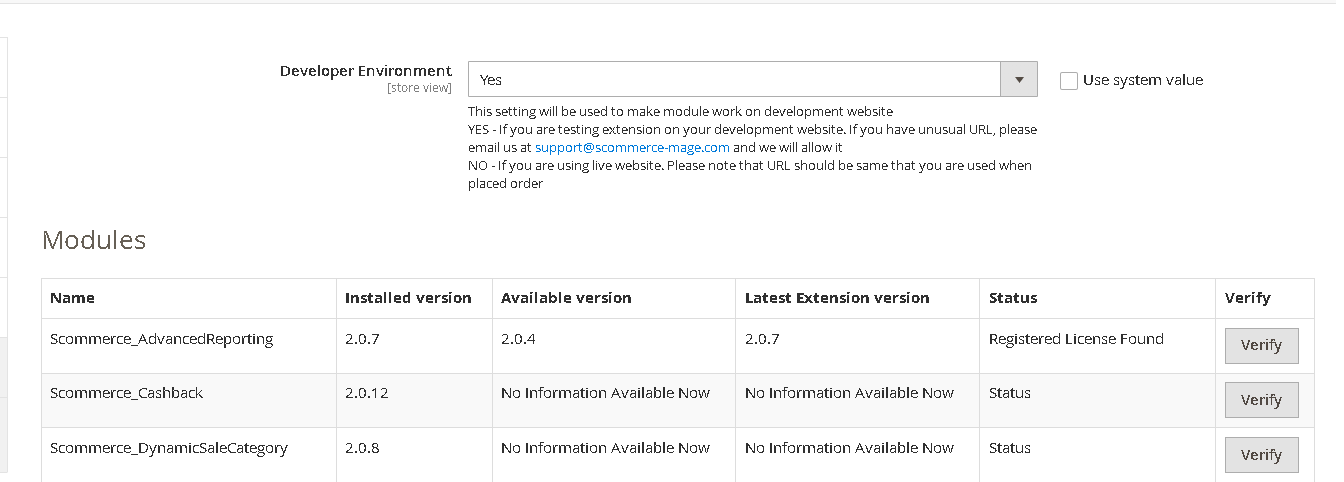
Once added go to Stores>Configuration>Scommerce Configuration>Core and click on verify. Once verified the license will start working on your staging site.
Q. Can I test the extension before buying?
A. Unfortunately we can't provide you extension for testing purposes but we have demo available for most of our extensions and happy to provide full refund if the extension doesn't work
Q. Can I request for customisation on your extensions?
A. Yes we do provide all sort of customisation for our clients at the reasonable rates. And if we believe the customisation will help our product then we also provide great discount on the customisation
Q. I have multiple websites/stores, each with a unique domain. Do I need a separate license key for each live domain?
A. Yes, each live domain requires its own license key. Our license keys are URL specific and each live domain, subdomain, subfolder requires a separate key. If you’re running multiple websites from the same Magento instance, we offer a 30% discount when purchasing license keys for two or more domains in a single order. To receive a coupon code, please contact us at support@scommerce-mage.com.
Q. How can I upgrade my extension to the latest version?
A. If your extension is within the free upgrade period (12 months from purchased date) then simply email us with your order number and our team will send you the latest version of the extension but if it is outside free upgrade period then you need to buy an upgrade using the following link
https://staging.scommerce-mage.com/magento-extension-installation-service.html
Once you received the latest version of our extension then we would highly recommend to delete all the files and folder of our extension from your website first before uploading the latest version because we might have removed existing files and keeping existing files could cause problems on your website.
https://staging.scommerce-mage.com/magento-extension-installation-service.html
Once you received the latest version of our extension then we would highly recommend to delete all the files and folder of our extension from your website first before uploading the latest version because we might have removed existing files and keeping existing files could cause problems on your website.
Q. Does my license get expired after certain period?
A. No, your license is not going to get expired but we would highly recommend upgrading to get all the latest fixes (including security fixes if any), improvements and new features. In the upgrade, we also ensure it is compatible with the latest version of Magento and when you upgrade you will have a smooth transition.
Q.Where can I download the extension files?
A. Please login into your account on our website and go to the download link under my account section to download the extension package.
Q.Can you provide a key that works for our development (NOT PRODUCTION) environment which will work on a dynamic URL, for example, 12334.gitpod.com and 4567.gitpod.com?
A. Unfortunately it is not possible to generate license keys based on the dynamic URLs.
License keys need to be generated per domain or subdomain whether it is production or non-production.
Q. How can I manually uninstall your module?
A. Please follow the below steps -:
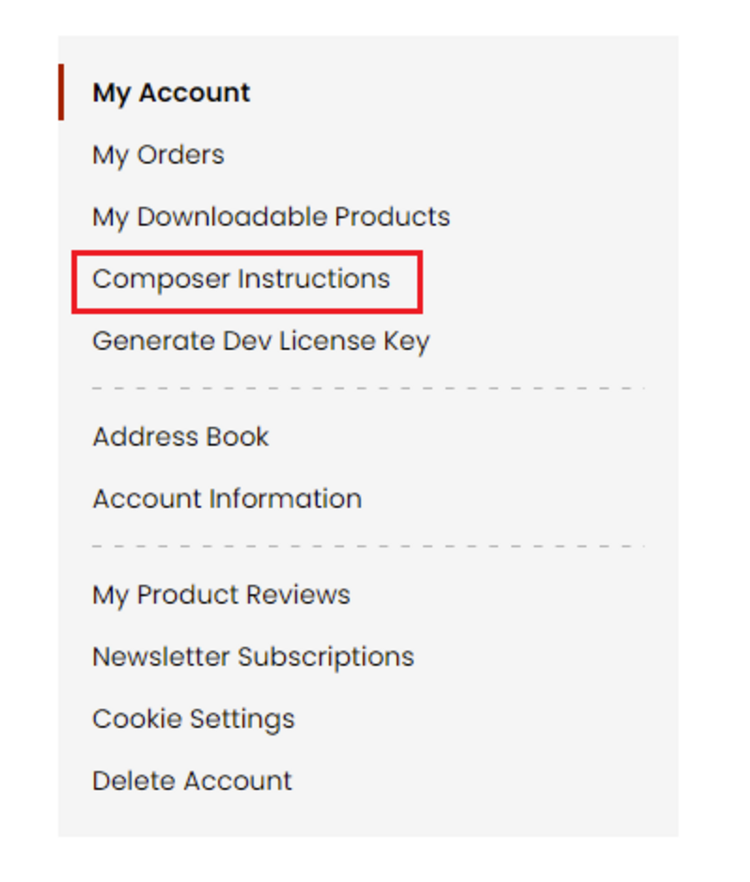
Step 1: Navigate to our store and login to your account. Then go to the My Account Section, on the left menu click on Composer Instructions.
 Step 2: Next, run the config commands shown on the top of the page then click on the extension that you want to install. A composer require command will be revealed in the dropdown menu. Run the command then clear caches to complete the installation.
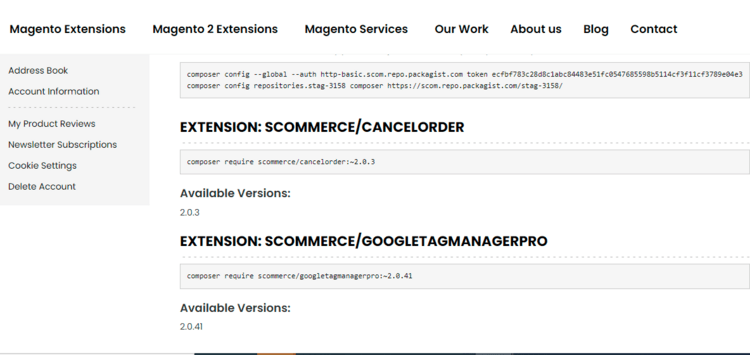
Step 2: Next, run the config commands shown on the top of the page then click on the extension that you want to install. A composer require command will be revealed in the dropdown menu. Run the command then clear caches to complete the installation.
Q. Do you support SPA (Single Page Application) / PWA (Progressive Web Application) / AMP ?
A. Unfortunately, we don’t support SPA or PWA or AMP but we may be supporting them in future depending upon the demand.
Change Log
Version 2.0.5
2025-09-22 12:02:34
Refactored template code of Admin login security to comply with the latest Magento security standards by implementing proper usage of the escaper function across PHTML files
Version 2.0.4
2025-08-20 09:09:31
Refactored template code to comply with the latest Magento security standards by implementing proper usage of the escaper function across PHTML files in Security Checklist module
Version 2.0.3
2025-08-19 08:10:22
Refactored template code to comply with the latest Magento security standards by implementing proper usage of the escaper function across PHTML files
Version 2.0.2
2025-07-03 11:03:39
- Resolved a duplicate foreign key constraint issue during module setup.
- Resolved fatal compatibility errors by correcting the **setIpAddress()** method in **AbstractListEntry.php** to match the interface declaration
- Resolved fatal compatibility errors by correcting the **setIpAddress()** method in **AbstractListEntry.php** to match the interface declaration
Version 2.0.1
2025-05-22 06:48:15
- Improved license validation for suite package and made it independent from single packages
Version 2.0.0
2024-02-05 13:26:13
Initial Release
Show More
Show Less
Reviews
Write Your Own Review