Skype us at scommerce.mage or call +44(0)1483 487746

Magento 2 VAT Switcher
£89.99
Compatible with Magento 2 community and enterprise 2.3.3 - 2.4.x including cloud edition
Empower your customers and streamline your B2B and B2C sales with the Magento 2 VAT Switcher. This essential extension adds a clear, user-friendly toggle to your storefront, allowing shoppers to instantly switch between VAT-inclusive and VAT-exclusive pricing. Designed for the UK market, it respects customer group settings, remembers user preferences across sessions, and is fully compatible with modern Hyvä and Breeze themes. Stop confusing your customers and start offering the transparent, flexible pricing that different audiences demand.

Free Support
up to 60 days

Free Upgrades
up to 1 year

Fully open source
Product description
Magento 2 VAT Switcher
Compatible with Magento 2 community and enterprise 2.3.3 - 2.4.x including cloud edition
Serving a mix of B2B trade customers and B2C retail shoppers in the UK presents a unique challenge: how do you display prices? Retail consumers expect to see final, VAT-inclusive prices, while business buyers need to see VAT-exclusive costs for their accounting. By default, Magento makes you choose one fixed display method, which can alienate half your audience. The Magento 2 VAT Switcher elegantly solves this problem.
This extension places a simple, persistent switcher on your product pages and category listings, giving customers control over how they see your pricing. With a single click, all prices on the site dynamically update to show either the gross (inc. VAT) or net (ex. VAT) value, without page reloads. This instant feedback creates a seamless and transparent user experience, building trust and reducing friction at checkout.
The VAT Switcher is more than just a toggle; it’s an intelligent tool aware of your customer segments. You can configure it to automatically show VAT-exclusive prices to logged-in trade accounts (B2B) and VAT-inclusive prices to retail customers (B2C), ensuring each group sees the pricing format they expect by default. For guest users, the switcher defaults to your store's main configuration but allows them to override it, with their preference remembered via a cookie for their next visit.
Built with performance and compatibility in mind, the module integrates seamlessly with both standard Luma-based themes and modern, high-performance frontends like Hyvä and Breeze. All administrative settings—from enabling the feature to defining its visibility per customer group—are managed within the Magento admin panel, giving you full control over your store's tax display strategy.
Core capabilities include:
- Frontend Price Toggling: A clear UI element allows users to switch between Inc. VAT and Ex. VAT pricing on demand.
- Customer Group Awareness: Automatically sets the default price display based on whether the logged-in user is in a B2B or B2C customer group.
- Persistent User Choice: The selected VAT display preference is saved across the user's entire session and for future visits.
- Dynamic Price Updates: Prices across product listing pages, product detail pages, and other catalogue views update instantly.
- Hyvä & Breeze Compatibility: Engineered to work flawlessly with modern Magento frontends, ensuring a fast, lightweight implementation.
- Full Admin Control: Easily enable or disable the switcher, set the default view for guests, and control which customer groups see the toggle.
Stop forcing a one-size-fits-all pricing display on a diverse customer base. With the Magento 2 VAT Switcher, you can provide the clarity and flexibility that both trade and retail buyers expect, leading to higher conversions and improved customer satisfaction.
Main Features
- User-Friendly VAT Toggle: Adds a simple, accessible dropdown or button on the storefront for customers to switch between VAT-inclusive and VAT-exclusive prices.
- Dynamic Price Display: Instantly updates all product prices on category pages and product detail pages without requiring a page refresh.
- Intelligent Customer Group Rules: Automatically displays prices excluding VAT for designated B2B/trade customer groups and including VAT for B2C groups upon login.
- Persistent Preference: Remembers a guest or logged-in user’s last selected preference (inc. or ex. VAT) for the duration of their session and on return visits.
- Hyvä and Breeze Theme Compatible: Guaranteed to work seamlessly with modern, high-performance Magento 2 frontends, in addition to standard themes.
- Comprehensive Admin Configuration: Enable or disable the feature, set the default price display for guests, and control which customer groups can see and use the switcher.
- Strategic Placement: Designed for high-visibility areas like the store header, ensuring easy access on every page.
- Accurate Tax Calculation: Relies on your store's existing Magento tax rules and zones, guaranteeing the calculated VAT amount is always correct.
Compatible with Magento 2 community and enterprise 2.3.3 - 2.4.x including cloud edition
We offer 60 days of free support and 12 months of free upgrade for any standard Magento site when you buy this extension. You can also get our installation service for a small fee. If you want more benefits, you can purchase our 12 months of free premium support and free lifetime upgrade package. Please contact us if you need any assistance or customization for this extension. We will reply to you within 48 hours. We may also offer you a special deal or a free solution if we like your idea.
** Please refer to our FAQ or T&C section for running our extensions on multiple domains or sub-domains
FAQ
Frequently Asked Questions
Q. How does the switcher know the correct VAT rate to use?
A. The extension does not perform its own tax calculations. It leverages your existing, configured Magento tax rules, zones, and rates. It simply toggles the *display* of those correctly calculated taxes, ensuring accuracy.
Q. Can I set the default view for different customer types?
A. Yes. You can configure the extension so that logged-in users in your "Trade" or "B2B" customer groups see prices excluding VAT by default, while retail (B2C) groups see prices including VAT.
Q. What do guest users see when they first visit the site?
A. You can set the default display mode for all guest users in the admin configuration (e.g., show prices including VAT). Guests can then use the switcher to change the view, and their preference will be remembered for their next visit.
Q. Where does the VAT switcher appear on the page?
A. The switcher is designed to be placed in a prominent, persistent location like the store header, making it easily accessible to customers on any category or product page they visit.
Q. Does this affect the final price in the shopping cart and checkout?
A. The switcher's primary function is to change the price *display* throughout the catalogue. The final, legally required tax calculation at checkout will still be based on your store's tax configuration and the customer's shipping address, ensuring compliance.
Q. How can I get license key for my development website?
A. Please use the same license as live site provided with the order confirmation email on the staging site and ensure you have the latest version of scommerce/core installed i.e 2.0.9.
Once added go to Stores>Configuration>Scommerce Configuration>Core and click on verify. Once verified the license will start working on your staging site.
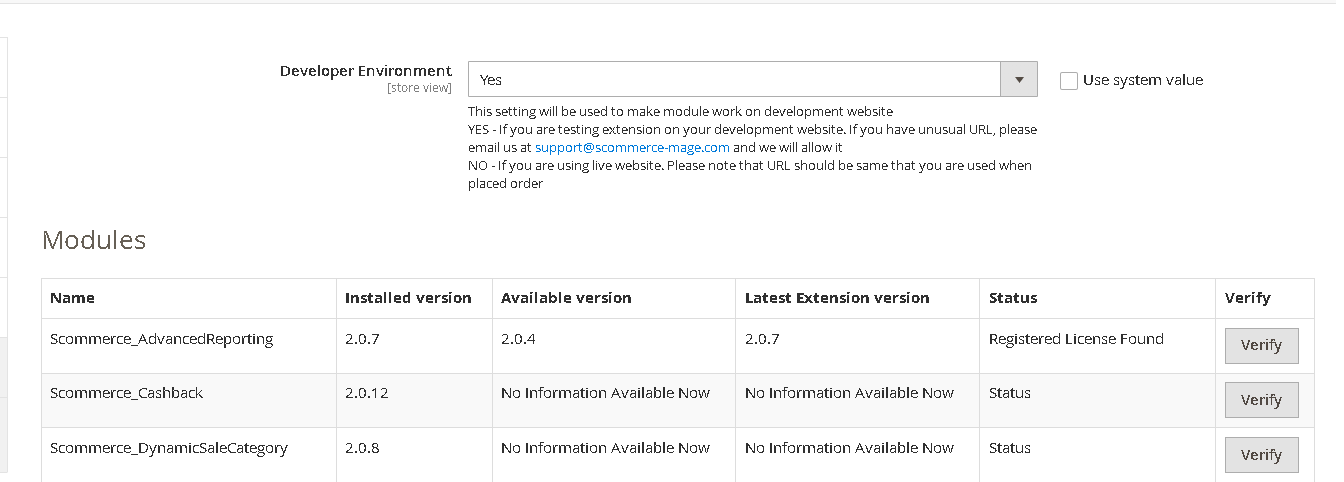
Once added go to Stores>Configuration>Scommerce Configuration>Core and click on verify. Once verified the license will start working on your staging site.
Q. Can I test the extension before buying?
A. Unfortunately we can't provide you extension for testing purposes but we have demo available for most of our extensions and happy to provide full refund if the extension doesn't work
Q. Can I request for customisation on your extensions?
A. Yes we do provide all sort of customisation for our clients at the reasonable rates. And if we believe the customisation will help our product then we also provide great discount on the customisation
Q. I have multiple websites/stores, each with a unique domain. Do I need a separate license key for each live domain?
A. Yes, each live domain requires its own license key. Our license keys are URL specific and each live domain, subdomain, subfolder requires a separate key. If you’re running multiple websites from the same Magento instance, we offer a 30% discount when purchasing license keys for two or more domains in a single order. To receive a coupon code, please contact us at support@scommerce-mage.com.
Q. How can I upgrade my extension to the latest version?
A. If your extension is within the free upgrade period (12 months from purchased date) then simply email us with your order number and our team will send you the latest version of the extension but if it is outside free upgrade period then you need to buy an upgrade using the following link
https://staging.scommerce-mage.com/magento-extension-installation-service.html
Once you received the latest version of our extension then we would highly recommend to delete all the files and folder of our extension from your website first before uploading the latest version because we might have removed existing files and keeping existing files could cause problems on your website.
https://staging.scommerce-mage.com/magento-extension-installation-service.html
Once you received the latest version of our extension then we would highly recommend to delete all the files and folder of our extension from your website first before uploading the latest version because we might have removed existing files and keeping existing files could cause problems on your website.
Q. Does my license get expired after certain period?
A. No, your license is not going to get expired but we would highly recommend upgrading to get all the latest fixes (including security fixes if any), improvements and new features. In the upgrade, we also ensure it is compatible with the latest version of Magento and when you upgrade you will have a smooth transition.
Q.Where can I download the extension files?
A. Please login into your account on our website and go to the download link under my account section to download the extension package.
Q.Can you provide a key that works for our development (NOT PRODUCTION) environment which will work on a dynamic URL, for example, 12334.gitpod.com and 4567.gitpod.com?
A. Unfortunately it is not possible to generate license keys based on the dynamic URLs.
License keys need to be generated per domain or subdomain whether it is production or non-production.
Q. How can I manually uninstall your module?
A. Please follow the below steps -:
Step 1: Navigate to our store and login to your account. Then go to the My Account Section, on the left menu click on Composer Instructions.
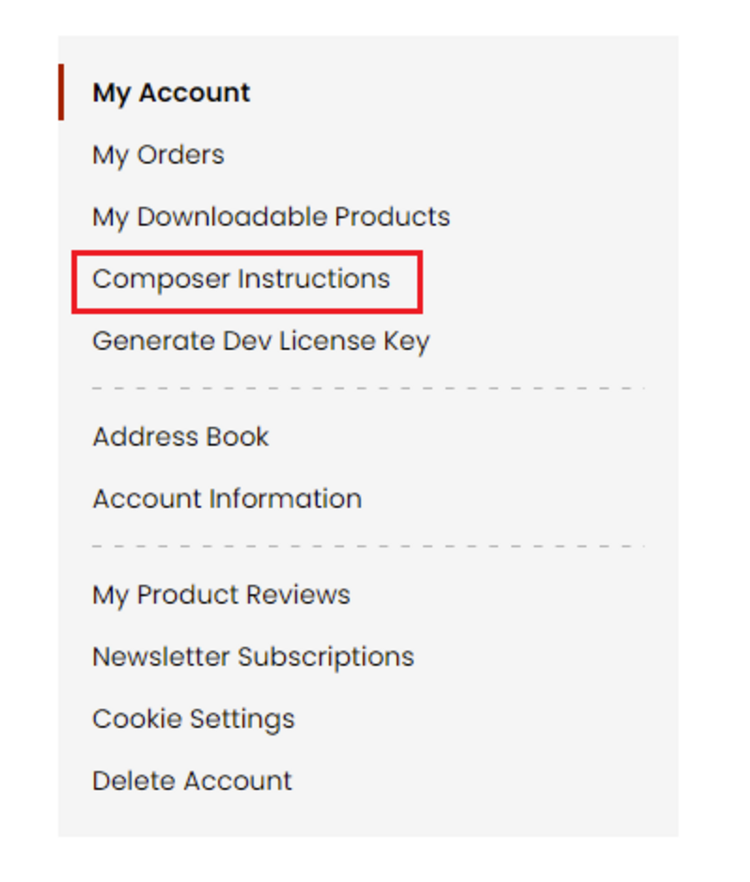 Step 2: Next, run the config commands shown on the top of the page then click on the extension that you want to install. A composer require command will be revealed in the dropdown menu. Run the command then clear caches to complete the installation.
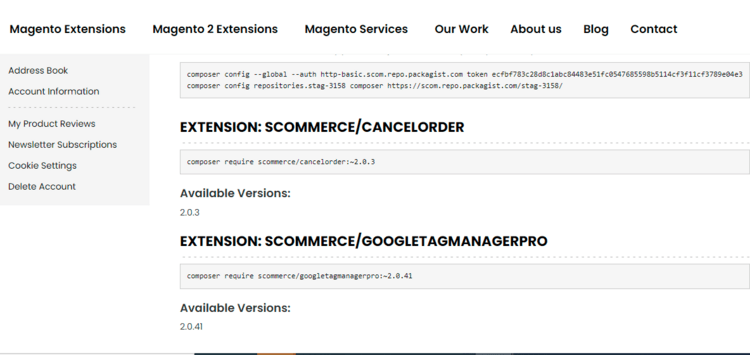
Step 2: Next, run the config commands shown on the top of the page then click on the extension that you want to install. A composer require command will be revealed in the dropdown menu. Run the command then clear caches to complete the installation.
Q. Do you support SPA (Single Page Application) / PWA (Progressive Web Application) / AMP ?
A. Unfortunately, we don’t support SPA or PWA or AMP but we may be supporting them in future depending upon the demand.
Change Log
Version 2.0.1
2025-12-01 07:48:08
Refactored template code to comply with the latest Magento security standards by implementing proper usage of the escaper function across PHTML files
Version 2.0.0
2025-09-08 11:43:23
Initial Release
Show More
Show Less
Reviews
Write Your Own Review